AWeber is an established email marketing platform designed to help small businesses, creators, and other organizations build subscriber lists, send email campaigns, and automate parts of their marketing.
The platform combines email marketing with landing pages, sign-up forms, automation, e-commerce features, and customer support. It also offers a permanent free plan for up to 500 subscribers, while paid plans add higher subscriber limits and more advanced features.
In this AWeber review, we’ll look at the current 2026 pricing, email marketing features, automation capabilities, pros and cons, and how AWeber compares with other email marketing platforms.
The goal is to help you determine whether AWeber fits your list size, marketing needs, and budget.
AWeber at a glance
AWeber is an email marketing platform designed for small businesses, creators, bloggers, and other organizations that want to build subscriber lists, send email campaigns, and automate their marketing.
- Best for: Small businesses, creators, bloggers, and organizations looking for email marketing and automation tools
- Free plan: $0 for up to 500 subscribers and 3,000 emails per month
- Paid plans: Lite from $12.50/month and Plus from $20/month when billed annually
- Key features: Email campaigns, landing pages, signup forms, email automation, segmentation, analytics, and e-commerce tools
- Free trial: 14-day trial available for paid plans
- Integrations: 750+ integrations with third-party tools
What is AWeber?
AWeber is an email marketing platform that helps businesses, creators, bloggers, and organizations build subscriber lists, send email campaigns, and automate communication with their audience.
The platform includes tools for managing subscribers, creating emails, building landing pages and signup forms, setting up automated workflows, and tracking campaign performance. AWeber also provides e-commerce features and integrations with third-party applications.
AWeber has been in business since August 20, 1998, making it one of the longer-established email marketing platforms.
The platform is designed to cover the main stages of an email marketing workflow: collecting subscribers, sending newsletters or campaigns, automating follow-up emails, and analyzing results. Its landing page and signup form tools can also be used to grow an email list without requiring a separate landing page platform.
If you’re new to the SaaS model, you can also read our guide to What Is SaaS Software? to understand how cloud-based software platforms like AWeber work.
AWeber review: Key Features
Email builder and templates
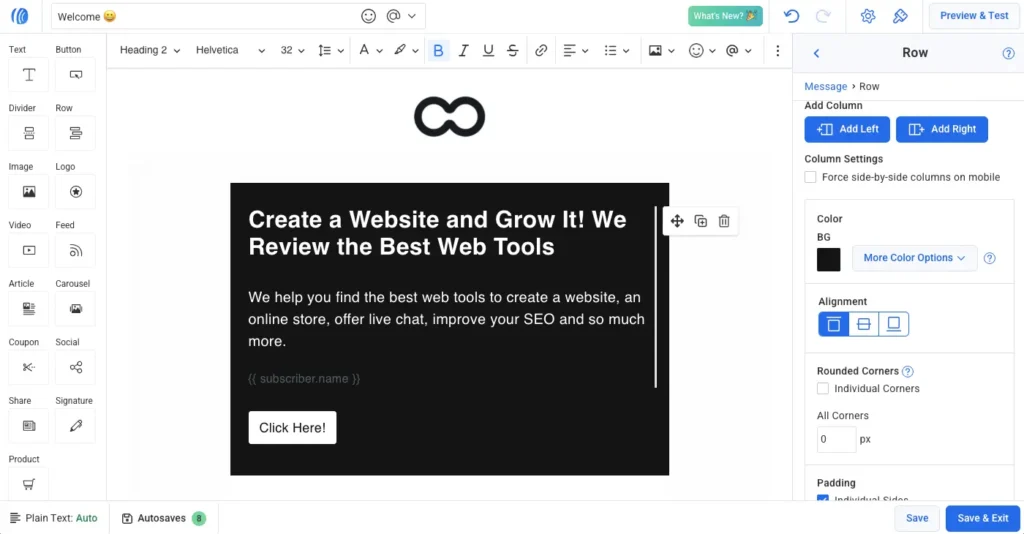
AWeber includes a drag-and-drop email editor that lets you create newsletters and marketing emails without coding. The platform also provides templates and tools for creating branded messages, making it possible to build campaigns without designing every email from scratch.
The email editor also includes built-in AI features that can generate email ideas, subject lines, and draft content directly inside AWeber. You can also paste existing content, such as a blog post, and use AI to turn it into email-ready copy.
Email automation
AWeber provides visual automation tools for creating automated subscriber journeys. You can use workflows for welcome sequences, lead magnets, sales funnels, abandoned-cart emails, post-purchase follow-ups, and re-engagement campaigns.
The automation builder also supports split paths, allowing subscribers to follow different paths based on actions such as clicks, opens, purchases, or tags. Performance metrics can also be viewed within the visual workflow.
This makes AWeber suitable for both simple autoresponder sequences and more structured subscriber journeys.
Landing pages and sign-up forms
AWeber includes landing pages and sign-up forms for collecting new subscribers. Its drag-and-drop landing page builder can be used to create mobile-responsive pages without coding, and landing pages connect directly to AWeber lists so new subscribers can enter automated workflows.
Landing pages can also support e-commerce functionality through Stripe, allowing businesses to sell products, services, courses, and digital downloads directly from a page.
AI writing tools
AWeber has expanded its AI features beyond basic email writing. Its AI tools can generate subject lines, email drafts, and content ideas, as well as rewrite existing content and adjust its tone. The platform also offers AI-powered tools for landing pages and signup forms.
For businesses that regularly publish newsletters or promotional emails, these features can reduce the amount of manual writing required.
Customer support
AWeber provides customer support through phone, email, and live chat. However, the support hours differ by channel.
Phone support is currently available Monday through Friday from 8:00 AM to 8:00 PM ET, while ticket and chat support are available 24/7.
This is worth considering if customer support availability is an important factor when choosing an email marketing platform.
AWeber review: Pricing in 2026
AWeber offers a permanent free plan alongside three paid subscription options: Lite, Plus, and Unlimited. The paid plans are priced according to your subscriber count, so the monthly cost increases as your email list grows.
| Plan | Starting price | Subscriber limit | Key features |
|---|---|---|---|
| Free | $0 | Up to 500 | 3,000 emails/month, 1 automation, 1 landing page, AWeber branding |
| Lite | $12.50/month billed annually | 500 | 5,000 emails/month, 3 landing pages, 3 automations, 1 custom segment |
| Plus | $20/month billed annually | 500 | 6,000 emails/month, unlimited landing pages, unlimited automations, advanced reporting |
| Unlimited | From $899/month | 100,000+ | Designed for very large email lists and higher sending requirements |
AWeber also offers monthly billing. At the 500-subscriber level, Lite costs $15/month when billed monthly, while Plus costs $30/month. Annual billing reduces the effective monthly price to $12.50 for Lite and $20 for Plus.
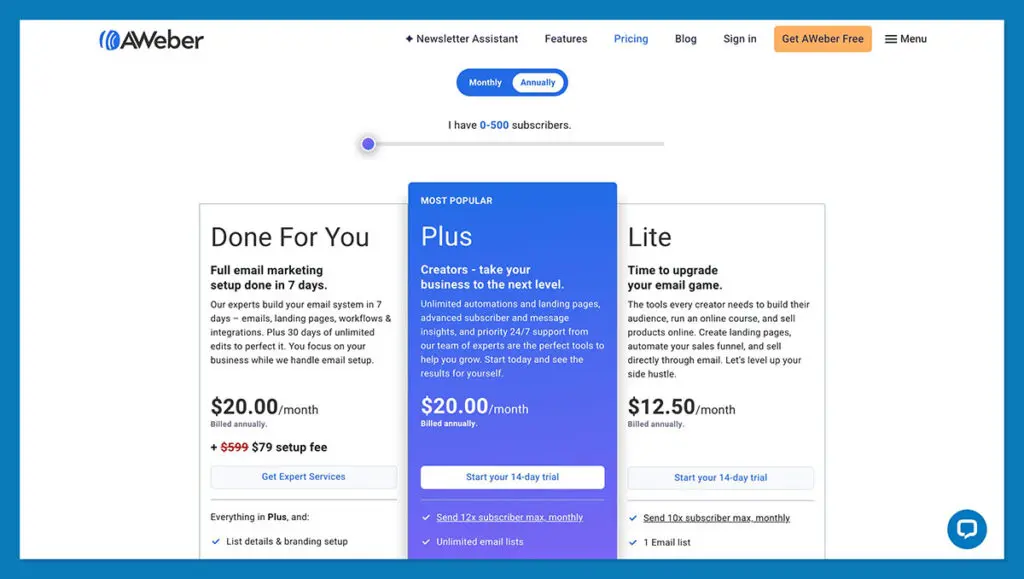
AWeber pricing for 500 subscribers, showing the Lite, Plus, and Done For You options. Pricing and offers may change.
The free plan is not a time-limited trial. It remains available at no cost for up to 500 subscribers and includes 3,000 email sends per month. A credit card is not required for the free plan.
For paid plans, AWeber also offers a 14-day free trial. You can test the selected paid plan during the trial, but the card on file is automatically charged when the trial ends unless you cancel beforehand.
AWeber pricing by subscriber count
The starting prices can be misleading if your email list is already growing. For example, the current annual pricing for Lite is $25/month at 1,000 subscribers, $35 at 2,500, and $60 at 5,000 subscribers. Plus costs $45/month at 1,000 subscribers, $55 at 2,500, and $90 at 5,000 subscribers.
| Subscribers | Lite/monthly | Lite/annual | Plus/monthly | Plus/annual |
|---|---|---|---|---|
| 500 | $15 | $12.50/mo | $30 | $20/mo |
| 1,000 | $25 | $20.83/mo | $45 | $37.50/mo |
| 2,500 | $35 | $29.17/mo | $55 | $45.83/mo |
| 5,000 | $60 | $50/mo | $90 | $75/mo |
| 10,000 | $100 | $83.33/mo | $135 | $112.50/mo |
AWeber also charges transaction fees on sales made through its ecommerce landing page element: 1.00% on Free and Lite and 0.60% on Plus, in addition to Stripe’s applicable fees.
When comparing AWeber with other email marketing platforms, look beyond the starting price. Your subscriber count, monthly sending requirements, automation needs, number of users, and ecommerce activity can all affect the total cost.
AWeber review: Pros and Cons
AWeber combines email marketing, automation, landing pages, signup forms, analytics, and e-commerce tools in one platform. Its main strengths are the permanent free plan, straightforward email marketing workflow, and broad feature set. The main trade-offs are subscriber-based pricing and feature limits on the lower-tier plans.
Pros
- Permanent Free Plan: AWeber Free supports up to 500 subscribers and 3,000 email sends per month without a time limit.
- Email automation: AWeber supports automated workflows, welcome sequences, behavioral triggers, and split paths for creating different subscriber journeys.
- Landing pages and signup forms: You can create landing pages and signup forms directly inside AWeber without needing a separate landing page platform.
- AI writing tools: Built-in AI features can help generate email content, subject lines, and other marketing copy.
- Large integration ecosystem: AWeber currently lists more than 750 integrations with third-party tools and services.
- No long-term contract: AWeber states that its plans do not require a long-term contract.
Cons
- Pricing increases with subscriber count: The monthly cost rises as your email list grows, so the starting price does not represent the cost for larger lists.
- Free plan has significant limits: Free users are limited to one list, one workflow automation, one landing page, and 3,000 monthly email sends.
- Lite has feature caps: The Lite plan limits users to three landing pages, three email automations, one custom segment, and three users.
- Some advanced features require Plus: Advanced reporting, unlimited automations and landing pages, unlimited custom segments, and removal of AWeber branding are available on Plus rather than Lite.
- Ecommerce transaction fees: AWeber applies transaction fees to sales made through its ecommerce features, with the rate depending on the plan.
- Paid plans require a credit card: A credit card is not required for the Free plan, but AWeber requires one for Lite, Plus, and Unlimited accounts.
Who should use AWeber?
AWeber can be a practical option for businesses and creators that need email marketing, subscriber management, landing pages, and automation in one platform. The free plan also makes it possible to start without a paid subscription, although it has limits on subscribers, email sends, lists, landing pages, and automation.
AWeber may be a good fit if you:
- Are building your first email list: The free plan supports up to 500 subscribers and 3,000 email sends per month, giving new users a way to start without paying for a subscription.
- Run a newsletter or content-based business: AWeber provides email campaigns, signup forms, landing pages, segmentation, and automation tools for growing and communicating with an audience.
- Need automated email sequences: Its workflow builder supports welcome campaigns, behavioral triggers, and Split Paths for more structured subscriber journeys.
- Sell products or digital offers: AWeber includes ecommerce functionality through its landing pages and email marketing tools.
- Want to connect several business tools: AWeber currently lists more than 750 integrations, including tools such as Shopify, WordPress, PayPal, and Zapier.
- Need multiple team members: Plus includes unlimited users, while Lite supports up to three users.
You may want to compare alternatives if you:
- Have a large or rapidly growing subscriber list: AWeber’s pricing increases with subscriber count, so the cost should be calculated using your expected list size rather than the starting price.
- Need more landing pages or automations on a lower-cost plan: Free and Lite have specific limits, while Plus provides unlimited landing pages and email automations.
- Need advanced reporting and analytics: These features are included in Plus rather than the lower-cost Lite plan.
- Have a large marketing team on the Free or Lite plan: Free allows only the account owner, while Lite supports up to three total users.
- Need a highly specialized marketing platform: In that case, compare AWeber with platforms focused specifically on advanced marketing automation, ecommerce, CRM, or other requirements that are central to your workflow.
AWeber Review: Alternatives
AWeber is not the only option for email marketing, and the right alternative depends on how you build and manage your email campaigns. Some platforms focus on simple newsletters, while others emphasize multichannel messaging, advanced automation, or CRM functionality.
AWeber vs MailerLite
MailerLite focuses on email marketing, landing pages, websites, and automation. Its current Free plan supports up to 250 subscribers and 2,500 monthly emails, while paid plans add more features and higher subscriber limits.
AWeber’s Free plan allows up to 500 subscribers and 3,000 monthly emails, so the two platforms have different limits even before comparing their paid plans.
If your priority is building newsletters, landing pages, and straightforward automations, comparing the available features and subscriber limits of both platforms can help determine which fits your workflow.
AWeber vs Brevo
Brevo uses a different pricing model from AWeber. Its Free plan allows up to 100,000 stored contacts but limits sending to 300 emails per day. Paid plans are primarily based on monthly email volume rather than simply the number of contacts stored.
Brevo also combines email with SMS, WhatsApp, chat, transactional messaging, and CRM features. This makes the platforms structurally different: AWeber centers more directly on email marketing and subscriber management, while Brevo provides a broader multichannel platform.
AWeber vs ActiveCampaign
ActiveCampaign focuses heavily on marketing automation, customer journeys, and CRM functionality. It can be relevant for businesses that need more complex automation logic and customer lifecycle workflows.
AWeber also supports automated workflows, behavioral triggers, and Split Paths, but the two platforms differ in their feature sets, pricing structures, and overall product focus.
If advanced automation and CRM workflows are central to your marketing strategy, ActiveCampaign is worth comparing with AWeber before choosing a platform.
AWeber vs EngageBay
EngageBay takes a broader all-in-one approach by combining CRM, marketing automation, sales tools, help desk, and live chat. AWeber is more focused on email marketing, subscriber management, landing pages, and email automation.
For a business that mainly needs email campaigns and automated sequences, AWeber and EngageBay serve different product needs. If CRM and customer support are also central requirements, comparing the complete feature sets of both platforms is useful.
AWeber alternatives at a glance
| Platform | Primary focus | Free option | Notable difference |
|---|---|---|---|
| AWeber | Email marketing and automation | Yes, up to 500 subscribers | Email campaigns, automation, landing pages, and ecommerce tools |
| MailerLite | Email marketing and website tools | Yes, up to 250 subscribers | Email, landing pages, websites, and automation |
| Brevo | Multichannel marketing | Yes | Email, SMS, WhatsApp, transactional messaging, and CRM |
| ActiveCampaign | Marketing automation and CRM | 14-day trial | More emphasis on customer journeys and CRM workflows |
| EngageBay | All-in-one CRM and marketing | Yes | CRM, marketing, sales, help desk, and live chat |
The main differences are the pricing model, automation requirements, contact limits, and additional business tools included with each platform. AWeber is centered on email marketing, while Brevo and EngageBay extend further into other customer-facing functions. MailerLite emphasizes email and website tools, while ActiveCampaign places greater emphasis on automation and CRM.
Before switching from AWeber, compare the plan that matches your actual subscriber count and the features you use most. A lower starting price does not necessarily mean a lower total cost once your list grows.
How to get started with AWeber
AWeber offers a Free plan, so you can create an account and explore the platform before committing to a paid subscription. The setup process guides you through your business information, subscriber details, email settings, and marketing goals.
1. Create your AWeber account
Start by creating an AWeber account and choosing the Free plan if you want to test the platform without a paid subscription.
During onboarding, AWeber asks for information such as your business or program name, website or social profile, industry, and experience level with the platform. You can skip the website field if you do not have a website yet.
2. Set up your sending information
Add the postal address associated with the business or organization sending the emails. AWeber requires this information as part of its email-sending setup and compliance requirements. You will also need to verify your email address before sending campaigns.
3. Add or import your subscribers
If you already have an email list, you can import subscribers into AWeber. Supported file formats include CSV, XLS, XLSX, TSV, and TXT. You can also manually paste subscriber information into the import tool.
If you are moving from another email marketing platform, AWeber also offers free migration assistance for eligible migrations.
Only import contacts who have given permission to receive your emails. AWeber specifically advises against importing unsubscribed contacts, addresses with repeated delivery failures, or subscribers who have not been emailed within the previous six months.
4. Create your first email campaign
Use AWeber’s drag-and-drop email builder to create your first newsletter, promotional email, or other campaign. You can start with a template and customize the content, branding, and layout without coding.
5. Create a landing page or signup form
If you need to grow your list, create a landing page or signup form directly inside AWeber. The drag-and-drop landing page builder lets you choose a template, customize the page, and connect the form to your subscriber list.
6. Build a welcome series
Create a welcome sequence to automatically communicate with new subscribers after they join your list. You can use AWeber’s workflow tools to send a series of emails and apply tags or other automation rules based on subscriber activity.
7. Test your workflow before upgrading
Once your account is set up, test the features that matter most to your business, such as email campaigns, landing pages, subscriber management, and automation.
If the Free plan no longer provides the subscriber capacity or features you need, compare the Lite and Plus plans using your actual list size and monthly sending requirements. AWeber’s paid pricing increases with subscriber count, so your expected list size is more important than the advertised starting price.
AWeber review: Final verdict
AWeber is an established email marketing platform that combines email campaigns, automation, landing pages, signup forms, analytics, ecommerce tools, and integrations in one system.
Its Free plan allows up to 500 subscribers and 3,000 email sends per month, giving businesses and creators a way to test the platform without a paid subscription. Paid plans add higher subscriber limits and more advanced features, but the cost increases as your list grows.
The main factors to consider are therefore your subscriber count, the number of emails you expect to send, the level of automation you need, and whether you require features such as advanced reporting, unlimited automations, or ecommerce functionality.
For someone starting email marketing, the Free plan provides a straightforward way to test AWeber’s core features before deciding whether a paid plan is necessary. If your requirements increase, you can compare Lite and Plus using your actual list size rather than relying on the advertised starting price.
If you need more specialized functionality, it is also worth comparing AWeber with platforms such as MailerLite, Brevo, ActiveCampaign, or EngageBay. The right choice depends on the features, pricing model, integrations, and automation capabilities that match your workflow.
Who is AWeber best suited to?
AWeber may be relevant if you:
- Need email campaigns and subscriber management in one platform
- Want to create landing pages and signup forms without separate software
- Need automated welcome sequences or subscriber workflows
- Want to start with a permanent Free plan
- Sell products, services, courses, or digital products through email marketing
- Need integrations with other business tools
You may want to compare alternatives if you need a different pricing model, more specialized CRM functionality, or features that are not included in your chosen AWeber plan.
Our AWeber review takeaway
AWeber provides a broad set of email marketing tools, with a permanent Free plan and paid plans that scale with subscriber count. The platform can be tested before committing to a subscription, which makes it easier to evaluate the features against your own email marketing workflow.
Before upgrading, check your current subscriber count, expected list growth, sending volume, automation requirements, and the features included in the plan you are considering.
Frequently Asked Questions About AWeber
Before switching, compare subscriber limits, pricing, automation features, integrations, and the specific tools your business uses most.
If you’re still comparing software, you can also read our guide to Best SaaS Tools with Free Trial in 2026.

Fedora writes step-by-step guides for non-technical founders, turning complex SaaS setups into clear, follow-along tutorials. She focuses on getting small business owners from sign-up to first results without the jargon.