EngageBay is an all-in-one CRM platform that combines customer relationship management, sales, marketing automation, and customer support in one system. Its main appeal is straightforward: small businesses can access several business tools without paying for multiple separate platforms.
But a lower price does not automatically make an all-in-one CRM the right choice.
In this EngageBay review, we’ll look at its current pricing, CRM and marketing features, automation tools, integrations, pros and cons, and the main limitations to consider before subscribing.
The goal is to determine whether EngageBay offers enough functionality and value for small businesses and when another CRM may make more sense.
EngageBay at a glance
EngageBay is an all-in-one platform that combines CRM, sales, marketing, and customer support tools in one system. The main appeal for small businesses is being able to manage several customer-facing functions without using separate platforms for each one.
- Best for: Small businesses that want CRM, marketing, sales, and support tools in one platform
- Free plan: $0 with up to 250 contacts
- Paid plans: Basic, Growth, and Pro plans with different contact and feature limits
- Key features: Contact management, deals, email marketing, landing pages, automation, help desk, and live chat
- Billing: Pricing varies by billing period, with lower per-user rates available on longer commitments
- Trial: EngageBay also offers paid-plan trials, subject to the terms shown when you sign up
What is EngageBay?
EngageBay is an all-in-one CRM platform built for small businesses and startups. It combines marketing automation, email marketing, sales CRM, appointment scheduling, live chat, and help desk tools in one platform. This allows businesses to manage customer relationships, sales activities, marketing campaigns, and support without relying on several separate systems.
You can find the latest product information and available features on the official EngageBay website.
EngageBay organizes its platform around marketing, sales, and customer support functions. Its product suite includes marketing automation, CRM & sales, help desk, and live chat tools. Businesses can use the all-in-one platform or select specific products depending on their needs.
EngageBay is often compared with HubSpot because both platforms combine CRM, marketing, sales, and customer-facing tools. EngageBay also positions its platform as an affordable all-in-one alternative for small businesses.
EngageBay review: Key features

CRM & sales pipeline
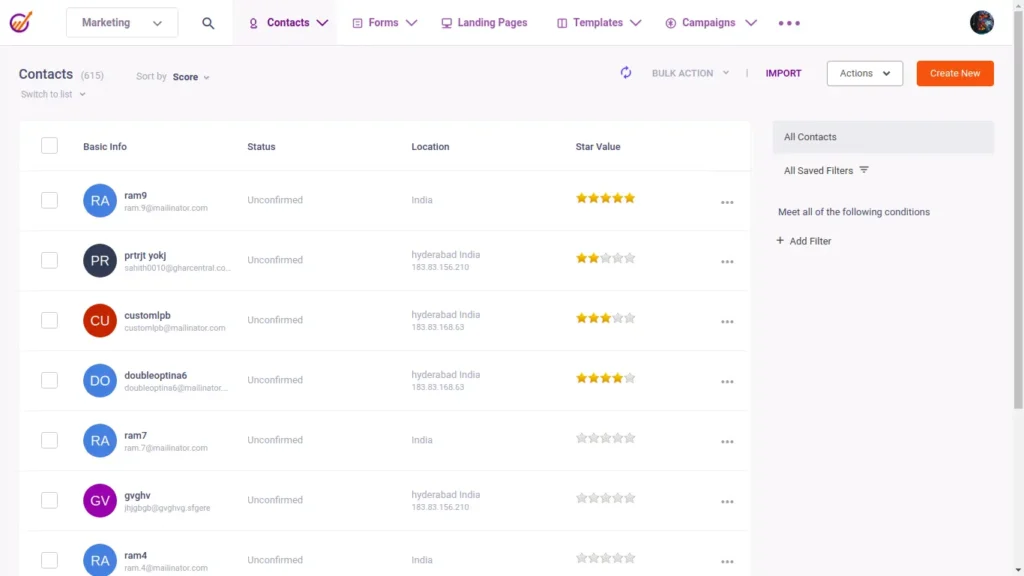
EngageBay’s CRM includes contact management, deal management, tasks, appointment scheduling, email tracking, and pipeline management. The free plan currently supports up to 250 contacts and companies, while paid plans increase contact limits and add additional sales features. (engagebay.com)
The CRM also includes features such as contact scoring, deal tracking, sales reporting, and email integration, giving small businesses a central place to manage customer and sales activity. (engagebay.com)
Marketing automation
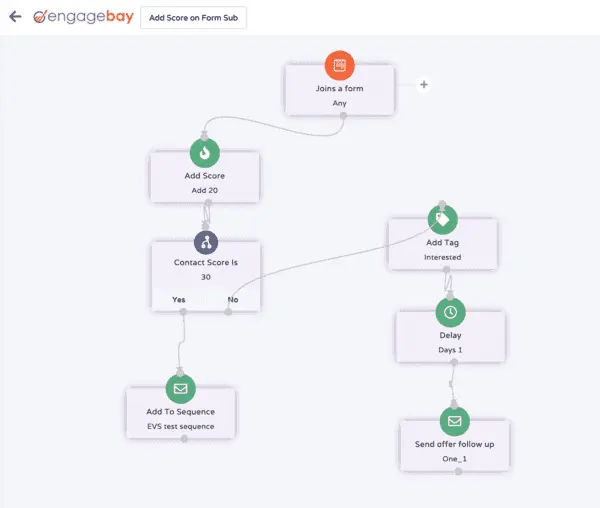
EngageBay combines email marketing with CRM and marketing automation features. Depending on the plan, users can access email broadcasts, autoresponders, email sequences, landing pages, forms, and automation workflows. (engagebay.com)
Higher-tier plans add capabilities such as marketing automation, push notifications, site messaging, and A/B testing for broadcasts and landing pages. This makes EngageBay suitable for small-business lead generation and follow-up workflows, although the exact automation features depend on the plan you choose.
Helpdesk and live chat
EngageBay also includes customer support tools alongside its CRM and marketing features. The platform provides help desk and live chat functionality, allowing businesses to manage customer inquiries and support conversations within the same broader system.
The current product offering also includes features such as ticket automation, a unified inbox, and customizable chat functionality, although availability varies by plan.
Landing pages, forms, and SMS
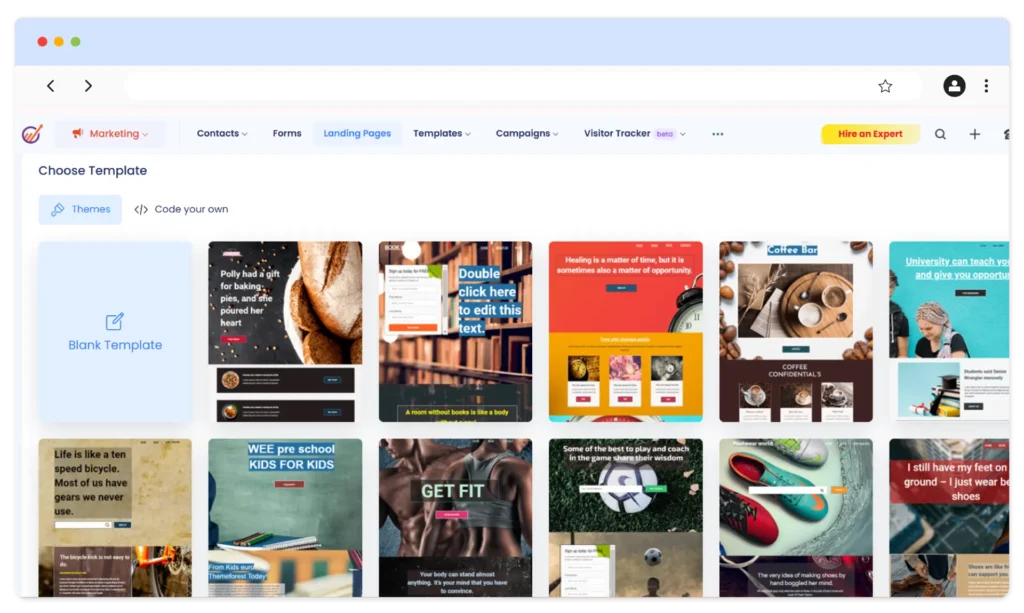
EngageBay includes landing pages and forms for lead capture, while paid plans add features such as a landing page builder, SMS marketing, and additional lead-generation tools.
The free plan also includes a limited landing page and form functionality, so businesses can test basic lead-generation workflows before upgrading.
Integrations
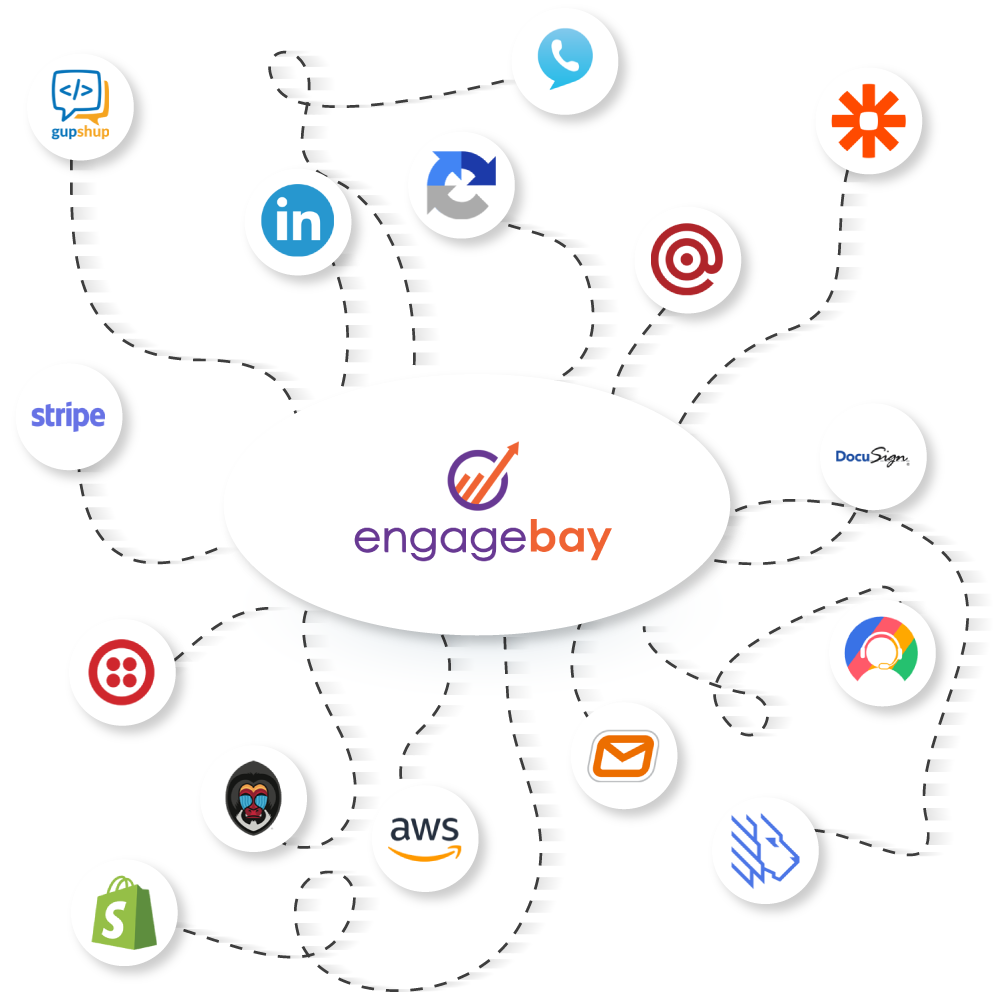
EngageBay currently lists integrations with more than 250 business tools, including Zapier, Shopify, Stripe, Twilio, QuickBooks, LinkedIn, SendGrid, Mailgun, and other third-party services.
Zapier and other integration platforms can also connect EngageBay with additional applications when a direct integration is not available.
EngageBay Review: Pricing in 2026
EngageBay offers a free plan alongside three paid All-in-One plans: Basic, Growth, and Pro. The plans combine CRM, marketing, sales, and customer support features, with higher tiers increasing contact limits and adding more advanced automation, reporting, and business tools.
Pricing varies depending on the billing period you choose. The lowest advertised rates are available with longer-term billing, while shorter billing periods cost more per user. This is an important detail to consider when comparing EngageBay with other CRM platforms.
| Plan | Price shown by EngageBay | Contacts | Key additions |
|---|---|---|---|
| Free | $0/user/month | 250 | CRM, email marketing, landing pages, helpdesk, live chat |
| Basic | From $12.74/user/month | 500 | Landing page builder, lead scoring, SMS marketing, integrations |
| Growth | From $55.24/user/month | 5,000 | Marketing automation, push notifications, A/B testing, custom domain |
| Pro | From $101.99/user/month | 10,000 | Custom reporting, web analytics, SSO, role management, phone support |
For the latest subscription costs and plan details, visit the official EngageBay pricing page.
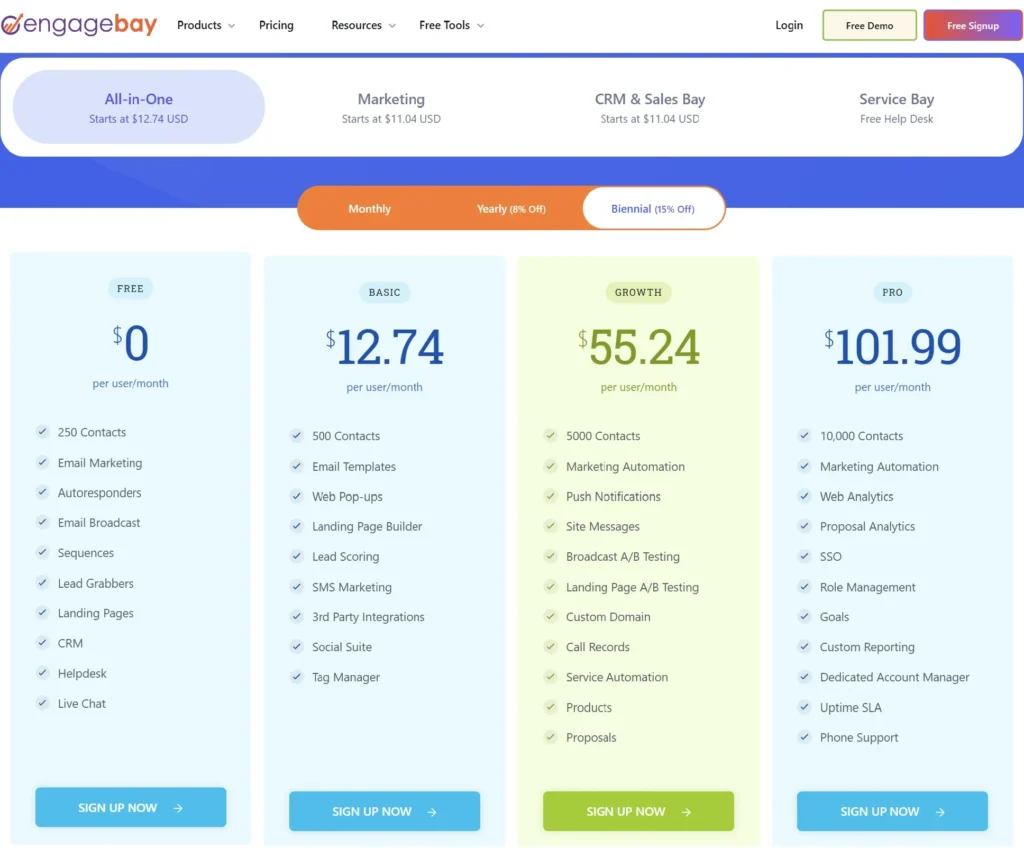
The free plan is the easiest way to test EngageBay because it includes core CRM, email marketing, landing page, help desk, and live chat functionality without a subscription fee. The main limitation is the 250-contact allowance.
The basic plan raises the limit to 500 contacts and adds features such as lead scoring, SMS marketing, a landing page builder, and third-party integrations. Growth increases the contact limit to 5,000 and adds marketing automation, A/B testing, push notifications, and other advanced tools. Pro increases the limit to 10,000 contacts and adds features such as custom reporting, web analytics, SSO, and phone support.
The main pricing consideration is not only the advertised monthly rate. You should also consider the number of contacts you need, the number of users on your account, the features included in your chosen plan, and the billing period. A longer billing commitment can reduce the effective monthly price, but it also means committing to EngageBay for a longer period.
EngageBay Review: Pros and Cons
EngageBay’s main strengths come from its all-in-one approach, accessible entry-level plan, and combination of CRM, marketing, sales, and customer support tools. Its main limitations become more relevant when you need deeper reporting, extensive customization, or a large ecosystem of direct integrations.
Pros
- Free plan with CRM, email marketing, landing pages, help desk, and live chat features
- CRM, marketing, sales, and customer support tools available in one platform
- Multiple plans allow businesses to increase contact limits and access more advanced features as they grow
- Interface designed to be accessible for small businesses and less technical users
- Marketing automation, email campaigns, lead scoring, and sales pipeline tools in the same platform
- Integrations with third-party applications, with additional connections available through integration platforms such as Zapier
Cons
- Contact and feature limits vary significantly between plans
- Advanced reporting and analytics are mainly available on higher-tier plans
- Some users report that certain workflows and interface elements could be more polished
- The direct integration ecosystem is smaller than some larger CRM platforms
- Per-user pricing can become more significant as the number of team members increases
- Some advanced automation and customization features require higher-tier plans
Who Should Use EngageBay?
EngageBay can be relevant for small businesses that want CRM, marketing, sales, and customer support tools in one platform. The free plan also provides a way to test the core platform before committing to a paid subscription.
EngageBay may be worth considering if you:
- Run a small business or startup and want CRM, marketing, sales, and support tools in one platform
- Need contact management, sales pipelines, email marketing, and customer support without managing several separate systems
- Want to start with a free plan and upgrade as your contact volume or feature requirements increase
- Need marketing automation and lead-generation tools alongside your CRM
- Prefer an all-in-one platform over combining several specialized applications
- Have a team size and contact volume that fit comfortably within the limits of your chosen plan
You may want to consider alternatives if you:
- Need highly advanced reporting, analytics, or CRM customization
- Depend on a specific application that does not have a suitable EngageBay integration
- Have a large team where per-user pricing becomes a significant part of your software budget
- Need specialized functionality that is better served by a dedicated CRM, marketing automation, or customer-support platform
- Require features that are only available on higher EngageBay plans and do not fit your budget
EngageBay Review vs alternatives
If you are comparing EngageBay with other CRM platforms, the right choice depends on which functions matter most to your business. EngageBay combines CRM, marketing, sales, and customer support in one platform, while alternatives such as HubSpot, Pipedrive, ActiveCampaign, and Zoho CRM have different product structures and areas of focus.
EngageBay vs HubSpot
EngageBay and HubSpot both offer CRM, marketing, sales, and customer-facing tools, but their pricing structures are different. EngageBay’s All-in-One plans bundle these functions into the same subscription, while HubSpot offers separate Hubs and bundled CRM products with different feature and usage limits.
HubSpot also offers a free CRM, while more advanced marketing, sales, service, and automation capabilities are available through paid products. EngageBay can therefore be useful for businesses specifically looking for an all-in-one subscription, while HubSpot may be more appropriate when you need its broader ecosystem and specific Hub capabilities.
EngageBay vs Pipedrive
Pipedrive is primarily focused on sales CRM, including deal management, pipelines, activities, and sales workflows. It offers a 14-day trial rather than a permanent free plan.
EngageBay covers a broader set of functions by combining CRM with marketing automation, email marketing, help desk, and live chat. Pipedrive may therefore make more sense for a business that mainly needs a sales-focused CRM, while EngageBay is designed for businesses that want several customer-facing functions in one platform.
EngageBay vs ActiveCampaign
ActiveCampaign focuses heavily on email marketing, marketing automation, customer engagement, and CRM-related workflows. Its plans and features are structured around marketing automation and customer experience use cases.
EngageBay combines marketing automation with CRM, sales, help desk, and live chat. If marketing automation is the primary requirement, ActiveCampaign is worth comparing directly with EngageBay’s automation capabilities. If you want CRM, marketing, and support functions in one platform, EngageBay offers a broader all-in-one approach.
EngageBay vs Zoho CRM
Zoho CRM is a sales-focused CRM with customization, automation, reporting, and connections to the wider Zoho ecosystem. Its free edition is available for up to three users, while paid editions add more advanced CRM capabilities.
EngageBay focuses more heavily on combining CRM, marketing, sales, and customer support in one subscription. Zoho CRM may be worth considering if CRM customization and the broader Zoho ecosystem are important to your workflow.
| Platform | Main focus | Free option | All-in-one CRM + marketing + support |
|---|---|---|---|
| EngageBay | CRM, marketing, sales, support | Yes | Yes |
| HubSpot | CRM, marketing, sales, service | Yes | Yes, through Hubs and bundled products |
| Pipedrive | Sales CRM and pipeline management | 14-day trial | No |
| ActiveCampaign | Marketing automation and customer engagement | Trial options | Not primarily an all-in-one CRM + support platform |
| Zoho CRM | CRM, sales, automation, customization | Yes, up to 3 users | Requires other Zoho products for broader functions |
The main difference is the type of platform you are looking for. EngageBay is designed around an all-in-one approach, while Pipedrive emphasizes sales CRM, ActiveCampaign emphasizes marketing automation, Zoho CRM emphasizes CRM customization and the wider Zoho ecosystem, and HubSpot provides a broader suite of connected business products.
Before choosing one, compare the specific features, contact and user limits, integrations, automation requirements, and total subscription cost for your own workflow.
Want to see how HubSpot compares in detail? Read our complete HubSpot CRM Review 2026.
How to Get Started with EngageBay
You can start with EngageBay’s Free plan without entering a credit card. The current Free plan includes CRM, email marketing, landing pages, help desk, and live chat features, with a limit of 250 contacts on the pricing page.
- Create your free EngageBay account. Sign up without a credit card and start with the Free plan.
- Import your contacts. Bring your existing contacts into EngageBay and organize them using lists, tags, segmentation, and contact fields.
- Set up your sales pipeline. Create your deal stages and start tracking opportunities through the CRM.
- Connect your email. Set up email campaigns, sequences, or autoresponders depending on the workflow you want to build.
- Create a lead-capture page or form. Use EngageBay’s landing pages and forms to collect new leads.
- Set up customer support tools if needed. You can use the built-in help desk and live chat to manage customer questions alongside your CRM data.
Once you have tested the Free plan with your own workflow, you can compare the limits and features of the Basic, Growth, and Pro plans before upgrading.
If you decide to upgrade, pay attention to the billing period as well as the monthly price displayed for the plan. Longer billing periods offer lower effective monthly rates, while shorter billing periods cost more.
EngageBay review: Final Verdict
EngageBay is a practical option for small businesses that want CRM, marketing, sales, and customer support tools in one platform. Its Free plan provides a way to test the core system without a paid subscription, while the Basic, Growth, and Pro plans add higher contact limits and more advanced features.
The main advantage is the breadth of tools available within one platform. Businesses can manage contacts and deals, create email campaigns and landing pages, automate marketing activities, and handle customer support through help desk and live chat features.
There are also trade-offs to consider. Advanced automation, reporting, customization, and higher usage limits are tied to paid plans, and the effective monthly price depends on the billing period you choose. The platform’s fit therefore depends on the features, contact volume, team size, and integrations your business actually needs.
For a small business considering EngageBay, starting with the Free plan is a practical way to test the CRM and customer-facing tools with your own workflow. You can then compare the limits of the paid plans before deciding whether an upgrade is necessary.
Who is EngageBay best suited to?
EngageBay may be worth considering if you:
- Want CRM, marketing, sales, and customer support in one platform
- Need to manage leads, contacts, deals, email campaigns, and support conversations in the same system
- Prefer starting with a free plan before committing to a subscription
- Need marketing automation alongside your CRM
- Want to reduce the number of separate software subscriptions in your workflow
You may want to compare alternatives if you need highly specialized marketing automation, advanced CRM customization, extensive reporting, or a specific integration that EngageBay does not support.
How We Evaluated EngageBay
This EngageBay review evaluates the platform based on its current pricing, feature set, CRM and marketing capabilities, integrations, support tools, and differences between its Free and paid plans.
Pricing and feature information was checked against EngageBay’s current product and pricing pages. User-experience observations should be interpreted alongside the platform’s current documentation and independent user reviews, which can vary depending on the user’s plan and use case.
Final takeaway
EngageBay is designed for businesses that want several CRM, marketing, sales, and support functions in one platform. Whether it is the right fit depends on how closely its available features, plan limits, integrations, and pricing match your workflow.
If you are considering EngageBay, start with the Free plan, test the features that matter most to your business, and compare the paid plans with alternatives before upgrading.
Frequently Asked Questions About EngageBay
If you are comparing EngageBay with HubSpot, read our complete HubSpot CRM Review 2026 for a detailed look at HubSpot’s pricing, features, pros, and limitations.

Fedora writes step-by-step guides for non-technical founders, turning complex SaaS setups into clear, follow-along tutorials. She focuses on getting small business owners from sign-up to first results without the jargon.