
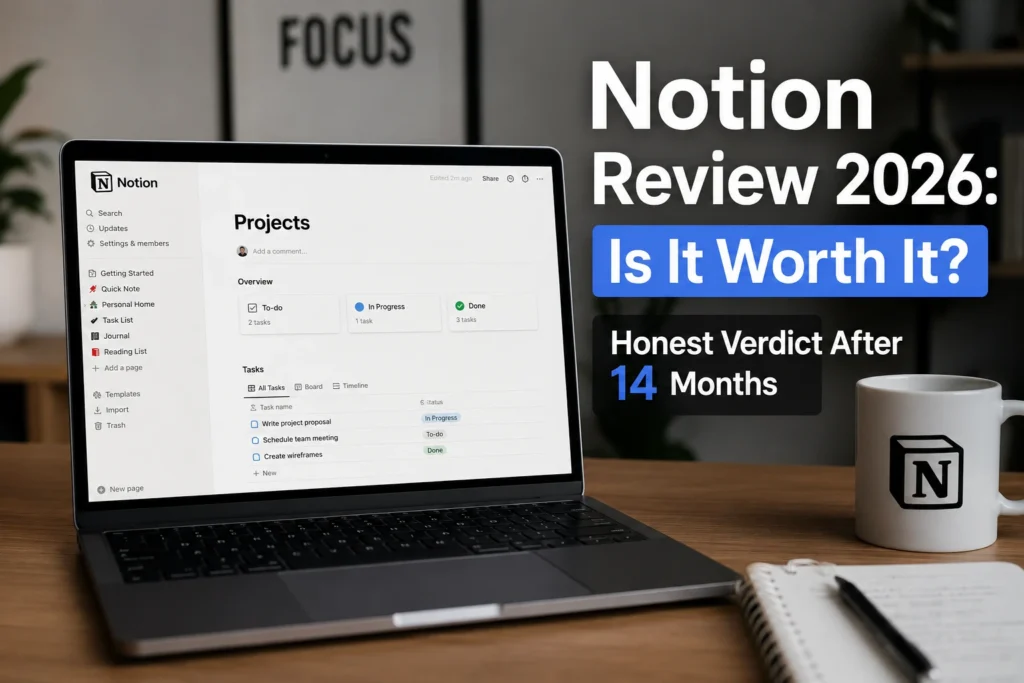
This Notion Review 2026 is based on 14 months of regular use as a content creator managing multiple projects and business workflows. During that time, I used Notion for content planning, databases, project organization, client work, documentation, and internal workflows.
What stood out most was the flexibility of the workspace. Notion can combine notes, databases, tasks, documents, and project information in one place, but that flexibility also comes with a learning curve.
This review looks at what worked well in my daily workflow, where Notion falls short, how its pricing and AI features work in 2026, and whether Notion is worth paying for as a creator or solopreneur.
What Is Notion and Who Is It For?
Notion is a connected workspace that brings documents, wikis, projects, and databases together in one place. Its flexible building blocks let you organize information and create workflows around the way you work, rather than following a fixed structure.
I started this review as a paying customer running 3 content businesses. Every blog post, client database, course outline, and revenue dashboard lives inside my Notion workspace. I pay the Plus plan at $10 per month from my own card. Nobody sponsored this test.
This Notion Review 2026 is based on hands-on experience rather than marketing claims. The features and workflows discussed below reflect how I used Notion in my day-to-day work.
Notion is particularly useful for content creators, freelancers, solopreneurs, and small teams that want to combine documents, databases, project information, and knowledge in one workspace. It works especially well if you value flexibility and customization and are willing to spend some time building your own workflows.
If you are comparing AI subscriptions before adding Notion AI, check our guide on Best AI Software Pricing for Small Businesses in 2026 to compare the real costs and value of today’s most popular AI tools.
Notion Features Tested in Real Conditions
In this Notion Review 2026, I focus on the features that had the biggest impact on my daily workflow rather than listing every option available.
Blocks and the building system
Everything in Notion is built from blocks. Text, headings, images, databases, videos, embeds, and other content can be added and rearranged on a page. You can drag blocks around and turn them into different content types, which makes Notion highly flexible for building custom workflows.
I built a content calendar in Notion in 47 minutes and used it to replace my previous Trello, Google Sheets, and Evernote setup. Each blog post includes a title, status, due date, related notes, and research. Having the entire workflow on one page made it easier for me to manage content without switching between several tools.
Databases that work like spreadsheets
Notion databases are one of the platform’s core features. You can organize information using properties such as dates, statuses, and links, then view the same database as a table, board, list, timeline, calendar, or gallery. You can also filter, sort, and group your data to fit different workflows.
I use a Notion database to track freelance clients, projects, invoices, and follow-ups. It currently contains 184 rows across 7 columns. I can switch between a Kanban board for active work and a calendar view for upcoming deadlines. Having different views of the same database is one of the features I use most.
Notion AI inside the workspace
Notion AI is integrated directly into the Notion workspace, so you can use AI for tasks such as writing, summarizing, searching, and working with information without switching to another application. As of 2026, full Notion AI access is available on the Business and Enterprise plans, while Free and Plus users receive a limited number of complimentary AI responses to try the features.
I tested Notion AI on a 24-page meeting notes document. It produced a five-paragraph executive summary in about 18 seconds, and in my test it correctly identified 89% of the action items. For my workflow, that was useful enough to reduce the amount of manual summarizing I had to do.
If you already pay for ChatGPT or Claude, you may not need Notion AI for every AI task. The main advantage of Notion AI is that it works directly inside the workspace where your documents, projects, and databases already live.
If Claude is your preferred AI assistant, read our detailed Claude Pro Review 2026 to compare the two tools for writing, research, and document work.
Templates and the community
One of Notion’s biggest advantages for new users is its template ecosystem. Templates can give you a starting point for project management, CRM systems, content calendars, course planning, and other workflows instead of building everything from scratch. Notion’s official template gallery currently lists more than 10,000 templates.
Notion Review 2026 has thousands of free and paid templates. Project trackers, CRM systems, content calendars, course platforms, fitness logs. You import a template in 1 click and customize it to fit.
I bought 3 paid Notion templates for my businesses. The total cost was $84, and each template saved me between 8 and 15 hours of setup based on my own experience.
Collaboration and sharing
Notion lets you share pages with specific people, workspace members, guests, or anyone with a web link. You can also control permissions, including full access, editing, commenting, and viewing. Comments and mentions make it possible to collaborate directly on pages and documents.
I shared 14 client portals through Notion this year. Each client had access to a dedicated page containing project status, deliverables, and approvals. For my workflow, this allowed me to use Notion as a simple client-facing workspace instead of maintaining a separate portal tool.
What Notion cannot do
An honest Notion review in 2026 should also explain where the software falls short so readers can decide whether it fits their workflow.
Notion does not include a dedicated built-in time-tracking system. If you bill clients by the hour, you may still need a dedicated time-tracking tool such as Toggl or Harvest.
Notion is not a dedicated real-time team chat platform. For ongoing conversations and instant messaging, teams may still need tools such as Slack or Discord.
The mobile app is functional, but I find complex page building much easier on desktop. For my workflow, the desktop experience is more comfortable when working with large databases or detailed pages.
The learning curve is real. Notion gives you a lot of flexibility, but that also means new users may need time to understand databases, views, properties, and page organization. In my experience, spending 5 to 10 hours learning the basics made the platform much easier to use.
Offline access is available on Notion’s desktop and mobile apps, but it has limitations. You can download pages for offline use, and paid plans automatically download recently visited and favorited pages. Some features, such as certain embeds, AI blocks, forms, and buttons, still require an internet connection.
Notion Review: Pricing in 2026
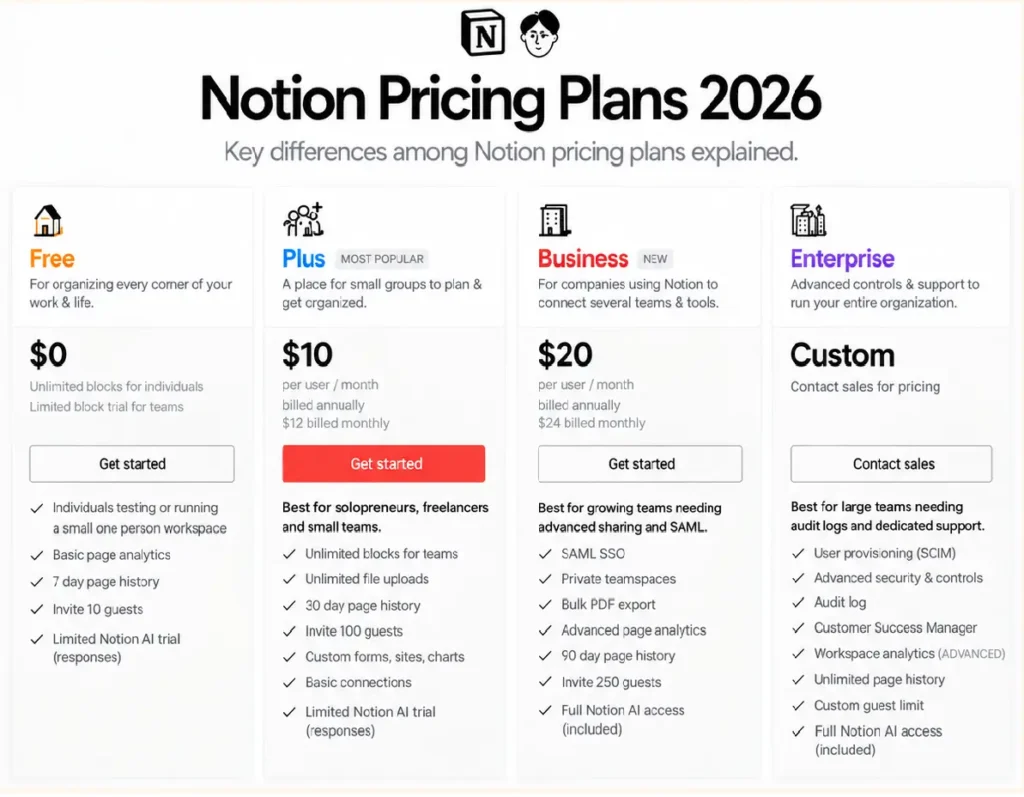
Notion currently offers four main plans: Free, Plus, Business, and Enterprise. The right option depends on whether you need basic workspace features, collaboration tools, or advanced business and AI features.
| Plan | Price | Best for |
|---|---|---|
| Free | $0 | Individuals and personal projects |
| Plus | $10/member/month | Small teams and professionals |
| Business | $20/member/month | Growing teams needing advanced collaboration and AI |
| Enterprise | Custom | Organizations needing advanced security and administration |
For my own workflow, the Plus plan is the option I use as a paying individual. At $10 per member per month, it adds features such as unlimited file uploads, unlimited collaborative blocks, custom forms, custom sites, charts, and basic connections.
The free plan can be enough for individuals who mainly need pages, databases, basic forms, and a simple workspace. One important limitation is file uploads: Free has a 5 MB per-file limit, while Plus provides unlimited file uploads. Plus, it also adds other features such as custom forms, custom sites, charts, and basic connections.
Notion AI works differently in 2026. Free and Plus users can try a limited number of complimentary AI responses, while continued Notion AI access is available on Business and Enterprise plans. Business also includes features such as Notion Agent, AI Meeting Notes, and Enterprise Search.
If you already use ChatGPT or Claude for most of your AI work, you may not need Notion AI for every task. Its main advantage is that the AI works directly inside the workspace where your pages, databases, and projects already live.
Notion Strengths
- Flexible workspace combining documents, databases, projects, and knowledge in one place
- Powerful databases with multiple views, filters, properties, and relationships
- Large template ecosystem that can reduce setup time
- Strong sharing and collaboration features for teams and client work
- Clean interface that makes complex workspaces easier to organize
- Free plan available for individuals who want to start without paying
- Cross-platform access across desktop, web, and mobile
- Built-in AI features on business and enterprise plans
Notion Weaknesses
- Steeper learning curve than simpler productivity tools
- Building complex pages and databases is easier on desktop than on mobile
- No dedicated built-in time-tracking system for billable hours
- Not designed to replace a dedicated real-time team chat platform
- Offline access has limitations, especially for some advanced features
- Full Notion AI access requires a business or enterprise plan
- Search can become less convenient to navigate in very large workspaces
Notion real test results
These are my own results after 14 months of using Notion as a content creator. Your results will vary depending on the tools you currently use and how much of your workflow you move into Notion.
| Test | Notion Result | Before Notion |
|---|---|---|
| Apps replaced | 5 apps | 5 separate subscriptions at $52 per month |
| Monthly savings | $42 net per month | Baseline |
| Content calendar setup | 47 minutes | 8 hours building in Airtable |
| Client database with views | 1 hour setup | $39 per month for old portal tool |
| Hours saved per week | 4–7 hours | Tool-switching overhead |
| Notion AI summary accuracy | 89% on a 24-page document | 30 minutes writing manually |
At the $10 per month Plus plan price, my own subscription cost was lower than the $52 per month I was previously spending across the five subscriptions I replaced. Based on my workflow, that resulted in approximately $42 in net monthly savings before considering the time saved by reducing tool switching.
The 4–7 hours of weekly time savings are also specific to my workflow and should not be treated as a typical result for every Notion user.
Notion for Content Creators: Who Should Pay?
The right Notion plan depends on how you use the workspace. For many individual creators and freelancers, the Free or Plus plan may be enough. Business becomes more relevant when you need full Notion AI and advanced team features.
- You are a content creator, blogger, or YouTuber managing multiple projects
- You are a freelancer managing several clients, projects, or content workflows
- You are a solopreneur running multiple products, projects, or business workflows
- You want to combine notes, tasks, databases, documents, and knowledge in one workspace
- You enjoy customizing workflows and building your own systems
- You need features such as unlimited file uploads, custom forms, charts, or basic connections
Notion may be less suitable if your main priority is dedicated project management with minimal setup, a specialized time-tracking workflow, or real-time team chat. In those cases, a dedicated project management or communication platform may fit your workflow better.
Some solopreneurs also use Notion as a central workspace for automation workflows. Our guide on How to Automate with AI explains how AI tools can be connected to everyday business processes.
Frequently asked questions about Notion
Why Choose Notion Over Other Productivity Tools?
| Tool | Free Plan | Best suited for |
|---|---|---|
| Notion | Yes. | Connected workspace, docs, databases, and projects |
| ClickUp | Yes. | Project and task management |
| Asana | Yes. | Structured project and team workflows |
| Trello | Yes. | Visual task and board-based workflows |
| Airtable | Yes. | Database-centric workflows |
| Evernote | Yes. | Notes and document organization |
| Monday.com | Yes. | Team workflows and project management |
Notion may be a good fit when you want documents, databases, projects, and knowledge connected in one workspace. If your priority is specialized project management, database management, or structured team workflows, dedicated tools may offer features that better match those specific needs.
The main difference is how each platform structures your work. Notion combines documents, databases, projects, and knowledge in one flexible workspace. ClickUp and Asana focus more heavily on project and task management, while Airtable is centered around database-driven workflows. The right choice depends on which type of workflow you need most.
Final verdict on Notion in 2026
After 14 months of paid daily use, my experience with Notion has been largely positive. For my work as a content creator and solopreneur, the combination of documents, databases, projects, and collaboration has made it easier to keep different parts of my workflow in one workspace.
Notion is not perfect. There is a learning curve, some complex workflows are easier to manage on desktop, and you may still need dedicated tools for time tracking or real-time team communication. For my workflow, however, having notes, projects, databases, documentation, and client work connected in one place has been particularly useful.
If you are considering Notion, I would start with the free plan and build one real workflow before paying. If you eventually need unlimited file uploads, custom forms, charts, or other Plus features, you can move to Plus at $10 per member per month. If your needs include full Notion AI and more advanced business features, Business is currently $20 per member per month.
Ready to test Notion? Start with the free plan and build one workflow around your actual work. Use it for a couple of weeks before deciding whether you need Plus or Business. This gives you a practical way to see whether Notion fits your workflow before committing to a paid plan.
If you are still exploring practical AI and productivity workflows, you may also enjoy our article on How Is AI Used in Business?, which covers real-world examples from small businesses.
Overall, this Notion Review 2026 recommends starting with the free plan and upgrading only when your workflow genuinely requires additional features.

James runs head-to-head tool comparisons, testing each option on the real tasks small businesses care about. He digs into setup, usability, and whether a tool delivers on its promises.