How is AI used in business? In plain terms, it means using smart software to automate tasks, save time, and make better decisions. For a small company, that usually looks less like a robot running the show and more like a tool that drafts your emails, answers repeat questions, or sorts your leads while you focus on the work only you can do.
Most owners hit the same wall: too many tools, too much hype, and no clear sense of what actually works. This guide shows exactly how AI is used in business with real examples, plain language, and honest USD tool costs so you can find where it fits without wasting money.
Why AI matters for small businesses right now
Small teams can save valuable time by using AI for writing, scheduling, customer support, and administrative tasks. According to Business.com’s 2026 Small Business AI Outlook Report, 57% of U.S. small and medium-sized businesses are investing in AI, up from 36% in 2023 — and SMB employees save an average of 5.6 hours per week using AI tools.
The appeal is simple. A solo consultant can reclaim several hours a week from email and follow-ups. A service business can reply to customers faster and get paid sooner. When you run sales, operations, and client work yourself, those hours matter.

What AI actually is (no jargon)
AI in business means software that helps with pattern-based work: drafting text, organizing information, spotting trends, or handling repeat requests. It doesn’t think like a person it predicts, suggests, sorts, and automates based on data and rules.
The difference between AI hype and reality
The hype says one tool will run your whole business. The reality is smaller and far more useful: most small businesses get the best results from one job at a time emails, invoices, support, or scheduling. The strongest use cases save time, not headcount. That’s a healthier way to judge what belongs in your workflow.
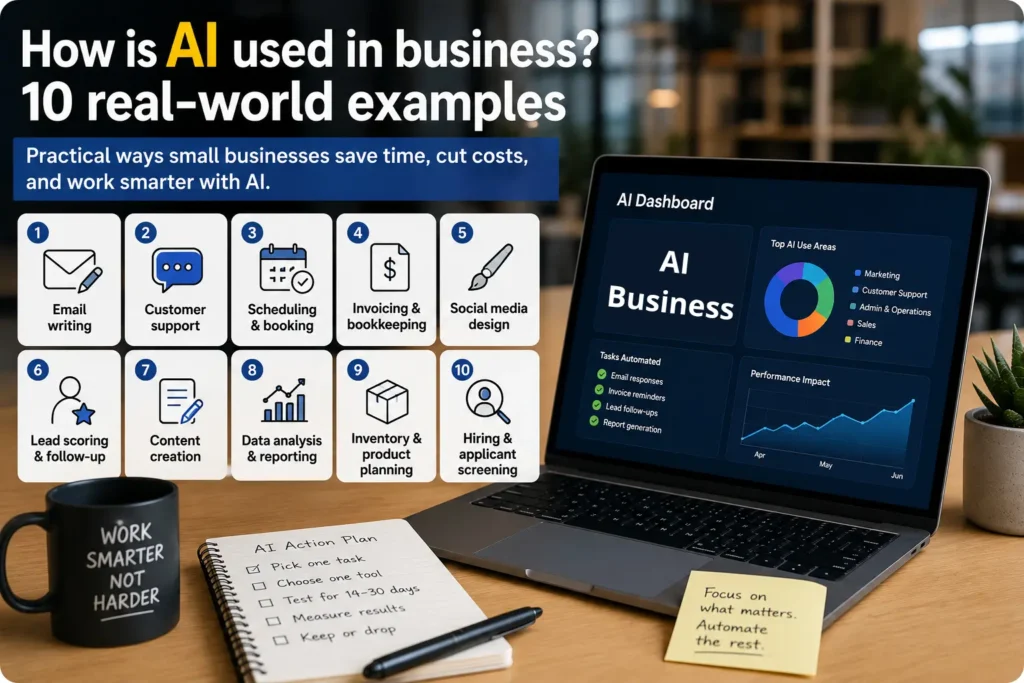
How Is AI Used in Business? 10 Real Examples
Each example below is daily work small owners already do with a real type of tool and a starting price in USD.
1. Email writing and cleanup. Writing assistants draft emails, fix tone, and cut editing time. Grammarly is a common pick free plan, with Pro from $12/month on annual billing. It can remove one to two hours of weekly rewriting on proposals and follow-ups.
2. Customer support replies. Support tools answer common questions, route chats, and suggest replies. Tidio starts at $29/month and has a free plan, so a store can handle delivery and refund questions after hours without missing sales.
3. Scheduling and booking. Scheduling tools kill the back-and-forth of booking calls and demos many stacks include a scheduler at $0. Send one link instead of ten emails, and cut no-shows.
4. Invoicing and bookkeeping. Accounting software sorts expenses, flags issues, and speeds up invoicing. QuickBooks Online runs around $38/month on Simple Start after promo periods, improving cash flow and reducing month-end cleanup.
5. Social media design. Design tools create posts, resize graphics, and keep branding consistent. Canva is free to start, with Pro around $15/month. Turn one promotion into Instagram, Facebook, and flyer formats in minutes no designer needed.
6. Lead scoring and follow-up. Sales platforms rank leads, track deal stages, and automate follow-up. HubSpot offers free tools, and Sales Hub Starter begins at $15/seat/month, so you focus on warm leads first instead of chasing every form equally.
7. Content creation. Content tools draft outlines, rewrite pages, and speed up ideas. Grammarly Pro (~$12/mo) and Canva Pro (~$15/mo) cover a lot for small teams. The gain is speed listing copy, captions, and simple flyers faster not perfect first drafts.
8. Data analysis and reporting. Analytics features summarize patterns in sales, traffic, or operations faster than a manual spreadsheet review often built into the Google or Microsoft tools you already pay for. A small agency can spot which services carry margin and which clients create low-value admin.
9. Inventory and product planning. Product businesses use predictive features to watch demand and stock levels. QuickBooks Plus (around $115/month) is one example for inventory-heavy businesses, helping reduce stockouts on top sellers and avoid overordering slow items.
10. Hiring and applicant screening. Hiring tools summarize resumes, organize applications, and speed up early screening often bundled into broader HR or productivity software. Use them to assist judgment on early sorting, not replace the final decision.
What AI can’t do
These tools don’t understand context the way a good operator does. They miss nuance, get facts wrong, and still need review which matters most in proposals, bookkeeping, hiring, and customer conversations. They also don’t fix weak processes: if your workflow is messy, automation just makes the mess faster. And some tools get expensive once you scale usage, contacts, or seats. Knowing those limits is part of understanding how AI is used in business well.
How to start using AI in your small business
The best way to start is small: pick one task that repeats every week and test one tool against it for 14 to 30 days.
- List your most repetitive weekly task: email, invoicing, support, or content are common starting points.
- Choose one tool with a free plan or low entry cost: Canva ($0), Grammarly ($0), or HubSpot free tools are safe starts.
- Use it for one clear workflow only: don’t spread it across the whole business on day one.
- Track one result: time saved, faster replies, more booked calls, or fewer admin errors.
- Keep it if it pays for itself: drop it if it adds complexity or weak output.
The smartest move isn’t buying everything. It’s testing one practical use case that saves time this month.
FAQ
The best AI tools for your business
Understanding how AI is used in business is the first step. Here’s where to go next:
- Compare the top tools by use case → best AI tools for small business
- Understand what AI subscriptions actually cost → best AI software pricing for small business
- Automate your workflows step by step → how to use AI automation for small business
- Read our in-depth Claude Pro review → Claude Pro Review 2026

Daniel esplora in prima persona gli strumenti emergenti di intelligenza artificiale e SaaS, distinguendo le funzionalità realmente utili dalle strategie di marketing. Scrive articoli esplicativi che aiutano i piccoli team a orientarsi in un settore in rapida evoluzione.