*Disclosure: This guide contains affiliate links. If you sign up through one of them, we may earn a commission at no extra cost to you. We only recommend tools we’d use ourselves.*
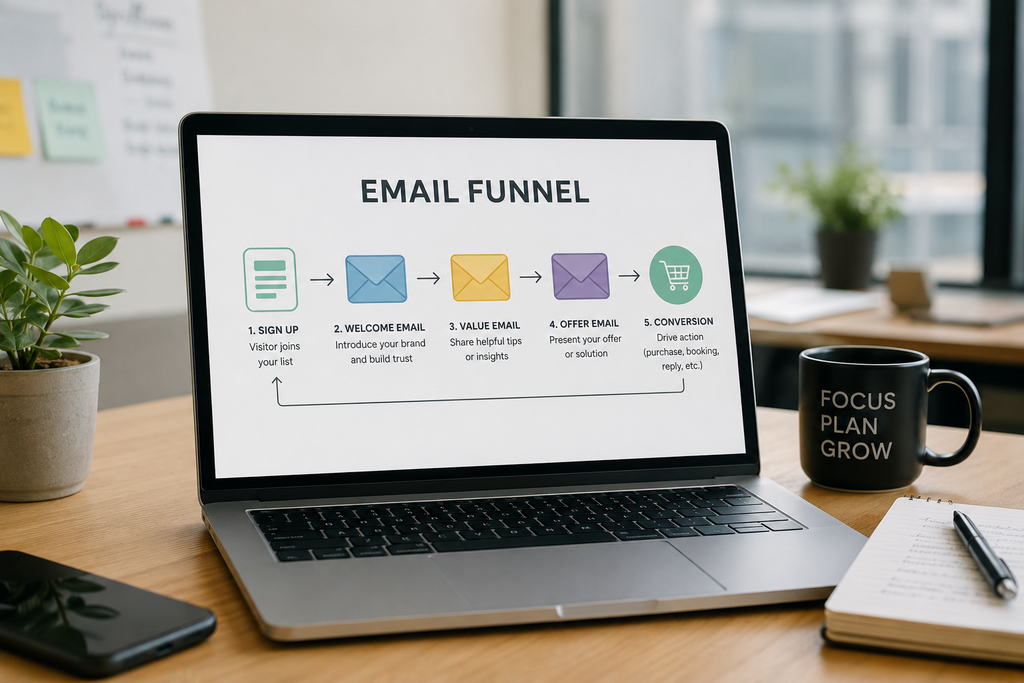
If you run a small business, an email marketing funnel is the closest thing you have to a salesperson who never sleeps. It turns a one-time visitor into a subscriber, then into a customer, on autopilot. Social reach keeps shrinking and ads keep getting pricier, but email gives you a direct line to people who already raised their hand once.
The good news for beginners: you don’t need a complicated system or a big budget. You need one goal, one offer, a short sequence of emails, and a tool to run it. This guide walks you through the whole thing in seven steps, then compares the three email platforms worth starting with in 2026 including which ones are genuinely free.
What an email marketing funnel actually is
An email funnel isn’t a complex machine. It’s a short series of emails, sent in order, triggered automatically when someone joins your list. Instead of blasting the same message to everyone, you send the right message at the right stage.
Most funnels move a person through four stages:
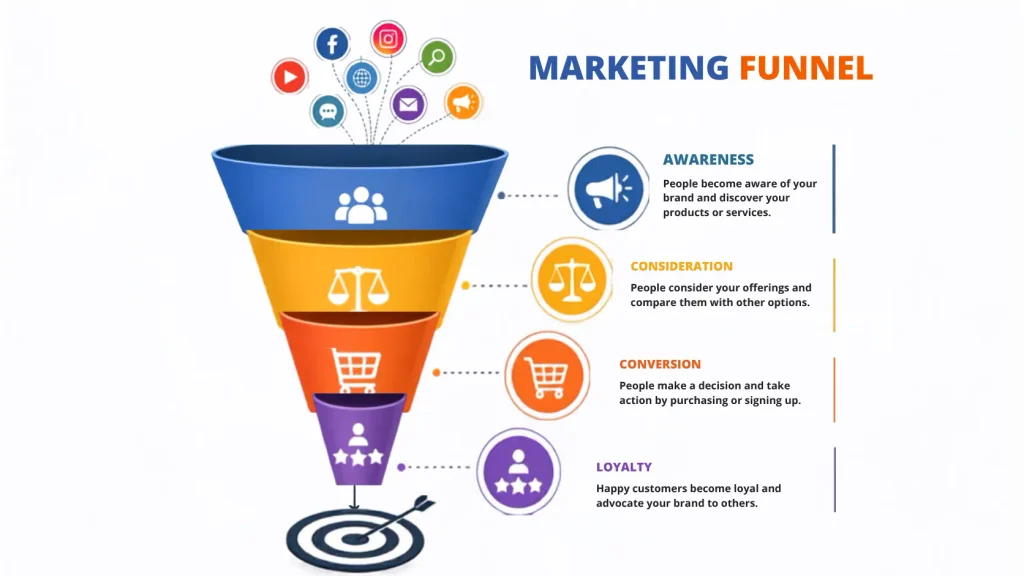
- Awareness: someone finds you and signs up for something useful.
- Consideration: you build trust with a tip, a story, or a bit of social proof.
- Conversion : you make one clear offer.
- Loyalty : you follow up and keep them coming back.
That’s it. You don’t need twenty emails or fancy branching logic. One goal, one offer, and four to five emails that each earn the next click.
How we evaluated these email tools
Not every platform is built for a solo owner doing everything alone. We scored each tool on what actually matters at the early stage:
- Free plan quality: can you run a real funnel at $0, or is it just a demo?
- Automation on the free tier: welcome flows and triggered emails without paying.
- Transparent USD pricing: no surprises after month three.
- Ease of setup: Can a non-technical owner launch a sequence in under an hour?
- Key integrations: Stripe, Shopify, WordPress, Zapier.
- Billing model: some charge per subscriber, others per email sent (this matters a lot as you grow).
All three tools below hold a 4.0+ rating on G2 or Capterra (ratings checked September 2026).
Best email marketing tools for small business (2026)
Here’s the honest, up-to-date picture. Note how differently these tools bill you that difference decides which one is cheapest for your situation.
| Tool | Free plan | Starting paid price | Bills you by | Automation on free? |
|---|---|---|---|---|
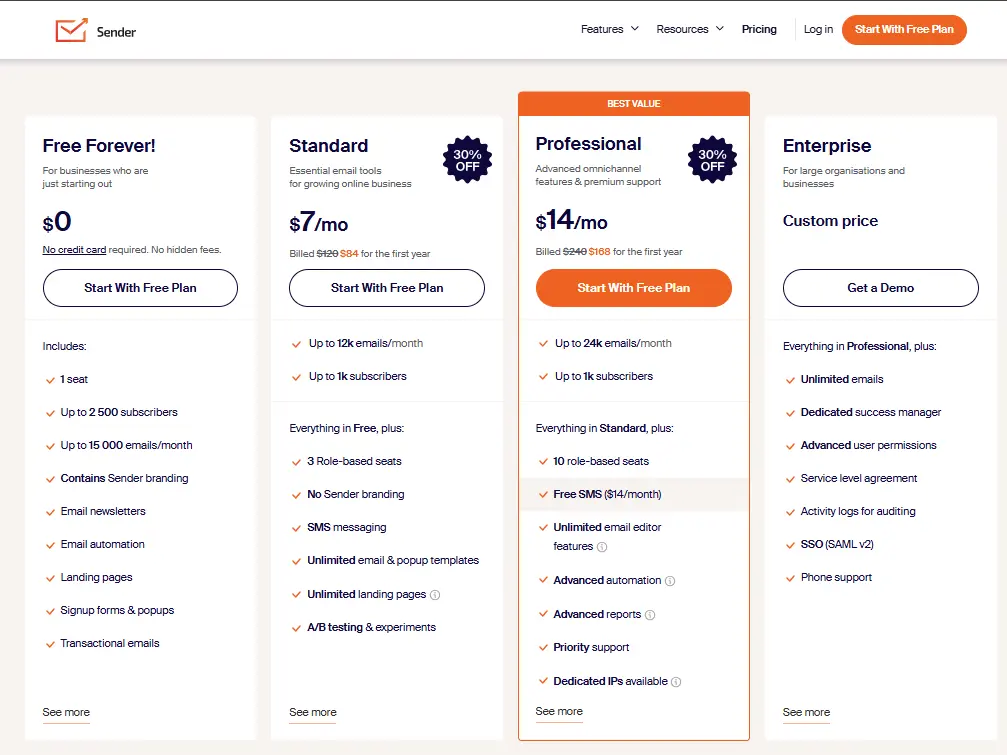
| Sender | 2,500 subscribers, 15,000 emails/mo | $7/mo | Subscribers | ✅ Yes |
| Brevo | 300 emails/day, unlimited contacts | $9/mo | Emails sent | ⚠️ Limited (up to 2,000 contacts) |
| Mailchimp | 250 contacts, 500 emails/mo | $13/mo | Contacts (incl. unsubscribed) | ❌ No |
Pricing verified September 2026. These platforms change plans often and re-check before you commit.
How to build your email marketing funnel in 7 steps
Step 1: Choose one goal
Pick a single action you want from the funnel: a booked call, a quote request, a purchase, or a download. Don’t mix three goals into one sequence; it dilutes every email and weakens the result.
Step 2: Pick your email tool
Choose the platform that fits your list size and budget (see the comparison above). If you want automation for free, Sender is the simplest starting point. If you have a big list you email only occasionally, Brevo’s per-email billing is cheaper. Set the account up before you build anything else everything after this lives inside it.
Step 3: Create one lead magnet
Give people a reason to join your list: a checklist, a discount code, a short guide, or a template. Keep it specific. A photographer might offer a “what to wear for your shoot” guide; a consultant might offer a one-page audit template. Simple and immediately useful beats long and impressive.
Step 4: Build your opt-in form and landing page
Ask for the minimum a first name and email are enough. Your landing page should communicate the value in one sentence, not five paragraphs. Every extra field and every extra line costs you signups.
Step 5: Write your email sequence
Four to five emails cover most beginner funnels:
- Welcome: deliver the lead magnet and set expectations.
- Trust: share a useful tip or a short personal story.
- Proof: include a testimonial, a case study, or a result.
- Offer : one clear next step, no pressure.
- Follow-up (optional): a gentle nudge if they didn’t act on email 4.
Step 6: Automate your email marketing funnel
Connect your opt-in form to your tool and set the sequence to trigger automatically when someone joins. Once it’s live, it runs around the clock. This is the whole point the automation handles the repeat work so you don’t have to.
For a step-by-step walkthrough of the triggers, delays, and conditions behind this, see our guide to email workflow automation.
Step 7: Test, measure, and improve
Watch three numbers for the first two weeks: open rate, click rate, and replies. If email 2 gets opened but nothing gets clicked, rewrite the call to action. If signups are low, fix the landing page before touching the emails. Small, data-based tweaks beat a full rebuild.
Sender: best free plan with automation included
Sender stepped into the gap Mailchimp left when it got expensive: professional email marketing, automation included, for free or nearly free.
What it does well. The free plan is genuinely generous, with 2,500 subscribers and 15,000 emails a month, with automation, segmentation, pop-ups, and analytics all included. The interface is clean, and you can launch a first funnel fast without digging through documentation. Paid plans add SMS from the same dashboard.
What you get on the free plan. Up to 2,500 subscribers, 15,000 emails/month, automated sequences, and forms no credit card required. For a beginner running a 5-email welcome flow to a growing list, this covers everything.
What you give up. Your emails carry Sender branding until you upgrade. Deliverability can be less consistent than premium tools, and the automation is more basic than what you’d get from an enterprise platform. You’re also hard-capped by your subscriber tier cross it and sending pauses until you upgrade.
Pricing (USD). Free: $0 (2,500 subscribers, 15,000 emails/mo). Standard: from about $7/mo (removes branding, adds features). Professional: higher tier with advanced automation.
Who it’s for. Beginners and small businesses that want real automation for free and don’t mind the branding while starting out.
➡️ Start free with Sender 2,500 subscribers, automation included.
Brevo: best for volume-based sending
Brevo is the strongest pick when you have a large list but email it only now and then. Most tools charge per contact; Brevo charges per email sent a meaningful difference when your list grows faster than your budget.
What it does well. Forms, campaigns, automation, segmentation, and transactional email in one place. Setup takes under 30 minutes for a first funnel, and the free plan lets you store a large list without paying for contacts sitting idle.
What you get on the free plan. 300 emails per day and unlimited contacts (up to 100,000 stored). Automation is included but limited to 2,000 contacts, and emails carry Brevo branding.
What you give up. The 300-emails-per-day cap is the real constraint send to 1,000 people and it spreads over several days. For time-sensitive promotions, that’s a problem until you upgrade.
Pricing (USD). Free: $0 (300 emails/day, unlimited contacts). Starter: from $9/mo (removes the daily cap, 5,000 emails/mo and up). Business: from $18/mo (adds advanced automation and A/B testing).
Who it’s for. Owners with a big or growing list who send a few campaigns a month and want a bill tied to email volume, not contact count. Many of these tools double as a light CRM if that’s what you’re really after; see our best all-in-one CRM guide.
➡️ Try Brevo free 300 emails/day, unlimited contacts.
Mailchimp: best for familiarity and integrations
Mailchimp is the most recognized name in email marketing, and its ecosystem of native integrations is the widest here. If your stack already connects to Mailchimp, setup time drops. That familiarity has real value but the free plan has been cut hard.
What it does well. Strong brand recognition, the largest library of native integrations, a solid template gallery, and decent analytics.
What you give up. The free plan now caps you at 250 contacts and 500 emails a month, and automation has been removed from it entirely so you can’t actually run a funnel for free anymore. Mailchimp also bills by contact count and charges for unsubscribed contacts unless you archive them, so the bill climbs as your list grows.
Pricing (USD). Free: $0 (250 contacts, 500 emails/mo, no automation). Essentials: from $13/mo (500 contacts). Standard: from $20/mo (adds automation and A/B testing).
Who it’s for. Small businesses already embedded in a Mailchimp-compatible ecosystem that want the path of least resistance not budget-conscious owners expecting their list to grow.
Free vs paid: what small businesses actually need
Most small businesses don’t need to pay for email right away.
When free is enough: you have a small list, you’re testing your first sequence, and you send a manageable volume each month. Sender’s free plan covers a real funnel automation included up to 2,500 subscribers. Don’t pay until the tool becomes the bottleneck.
When to upgrade:
- Growing list, tight budget → Sender Standard (~$7/mo) removes branding and raises limits.
- Large list emailed occasionally → Brevo Starter ($9/mo) keeps costs predictable with per-email billing.
- Already living in the Mailchimp ecosystem → Mailchimp Essentials ($13/mo) for the integrations.
For perspective: a freelance email marketer charges $500–$1,500/month to manage sequences by hand. A $7–$18/month tool runs the same sequences on autopilot.
Which tool is right for you?
| Your profile | Best tool | Cost |
|---|---|---|
| Complete beginner, first funnel | Sender (free) | $0/mo |
| Want automation without paying | Sender (free) | $0/mo |
| Large list, emailed occasionally | Brevo (free/Starter) | $0–9/mo |
| Growing list, predictable cost | Brevo Starter | $9/mo |
| Already in the Mailchimp ecosystem | Mailchimp Essentials | $13/mo |
What an email funnel can’t do (honest warning)
A funnel doesn’t fix a weak offer. If your lead magnet misses the mark, more emails won’t save it fix the offer first, then automate. It doesn’t replace clear positioning either; people need a reason to trust you before they act, and your emails earn that trust one message at a time.
Automation can also become noise. A useful 3-email sequence beats a 15-email funnel full of filler. Start short and extend only if the data tells you to. And watch the pricing curve: several tools are cheap at a few hundred subscribers and expensive at a few thousand. Know how your tool bills you before you commit.
How to start this week
- Pick one offer people actually want a guide, a discount, a checklist.
- Write a 4-email sequence: welcome, trust, proof, offer.
- Build one landing page and one opt-in form.
- Launch it in Sender or Brevo both are free to start.
- Track opens, clicks, and replies for two weeks, then adjust.
A strong email marketing funnel doesn’t need to be complex. It needs one goal, one offer, and a short sequence that builds trust before it asks for anything. Start free, stay lean, and upgrade only when you outgrow the free tier not before.
FAQ

Fedora writes step-by-step guides for non-technical founders, turning complex SaaS setups into clear, follow-along tutorials. She focuses on getting small business owners from sign-up to first results without the jargon.