Keap is an all-in-one CRM and business automation platform built for small businesses that want to connect lead management, sales follow-up, marketing automation, appointments, invoicing, and payments in one system.
The platform can replace several separate business tools, but that convenience comes with a higher starting cost and a more involved setup than a basic CRM or email marketing platform.
In this Keap Review 2026, we look at Keap’s CRM, marketing automation, email and SMS tools, invoicing and payments, integrations, ease of use, customer support, pros and cons, and the types of businesses it is best suited for.
We’ll also examine whether Keap’s combination of CRM and automation justifies its cost, what the main limitations are, and when another platform may be a better choice.
Keap at a Glance
Keap is an all-in-one CRM and business automation platform designed for small businesses that want to manage customer relationships, sales, marketing, appointments, and payments in one place.
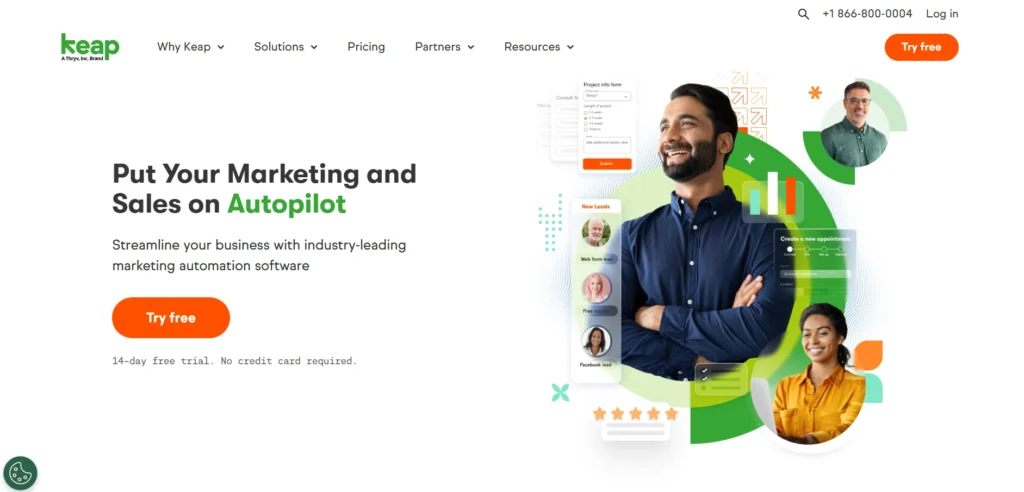
Key Facts About Keap
- Best for: Small businesses, service businesses, consultants, agencies, and businesses with repeatable sales or marketing processes
- Core platform: CRM, contact management, sales pipelines, marketing automation, email, SMS, appointments, invoicing, and payments
- Automation: Visual automation tools for lead follow-up, customer communication, sales processes, and other repetitive tasks
- Users: 2 users included; additional users cost $39/month each
- Starting price: $299/month or $2,988/year when billed annually
- Free trial: 14 days with no credit card required
- Implementation: Keap requires an implementation package for new customers
- Integrations: 5,000+ app connections through Zapier, plus native and other integration options
| Category | What Keap provides |
|---|---|
| CRM | Contact management, customer activity, lead tracking, and sales pipeline |
| Automation | Lead follow-up, appointment reminders, sales nurturing, and recurring business processes |
| Email & SMS | Email campaigns, automated follow-ups, text messaging, and broadcasts |
| Sales | Pipeline management, lead capture, appointments, quotes, and follow-up |
| Payments | Invoicing, payment collection, and payment-related automation |
| Landing pages | Lead capture forms and landing pages |
| Reporting | Sales and marketing performance tracking |
| Integrations | Connections with third-party apps and business tools |
The main advantage is the connection between these tools. Instead of managing separate CRM, email marketing, appointment, and payment systems, Keap brings many of these workflows into one platform.
Looking for the full cost breakdown? See our Keap Pricing 2026 guide for current subscription pricing, implementation costs, users, contacts, SMS, payment processing, and the free trial.
What Is Keap?
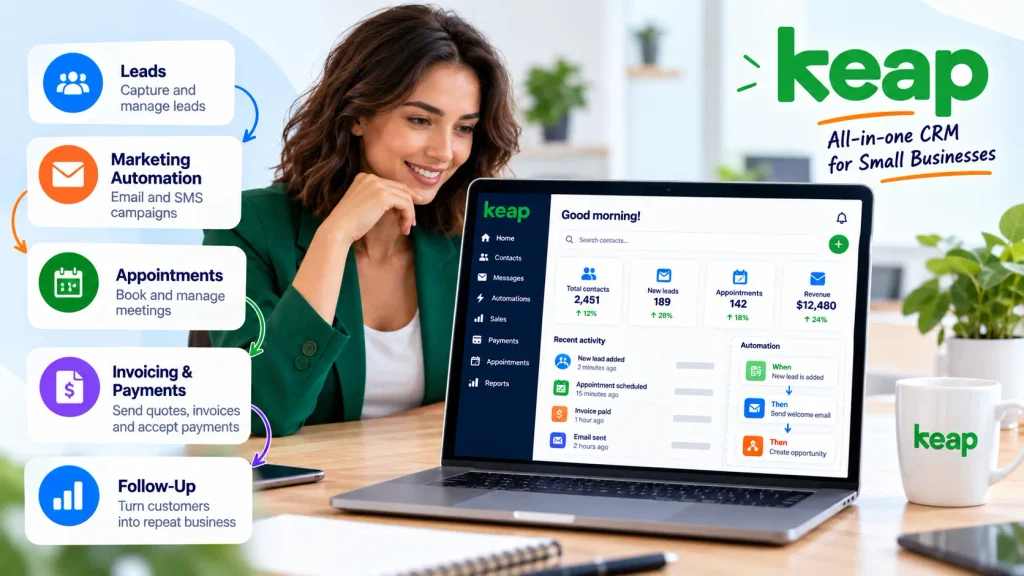
Keap is an all-in-one CRM and business automation platform designed for small businesses. It combines customer relationship management, sales and marketing automation, email and SMS communication, appointments, invoicing, and payments in one system.
Unlike a basic CRM that mainly stores customer information and tracks sales activity, Keap is built around automation. You can use it to capture leads, move prospects through a sales pipeline, send follow-ups, schedule appointments, collect payments, and automate repetitive customer communication.
What Does Keap Do?
Keap brings several business functions together in one platform:
- CRM and contact management: Store customer information, track interactions, and manage sales activity.
- Sales pipeline management: Capture leads, organize opportunities, and follow prospects through the sales process.
- Marketing automation: Create automated workflows for lead follow-up, customer communication, and sales nurturing.
- Email and SMS marketing: Send campaigns, follow-ups, and text messages as part of automated customer journeys.
- Appointments: Manage bookings and connect appointments with customer and sales workflows.
- Invoicing and payments: Create invoices, collect payments, and connect transactions with customer records.
- Integrations: Connect Keap with other business tools through native integrations and third-party services such as Zapier.
The idea behind Keap is simple: instead of managing these processes across several disconnected tools, you can connect them within one platform.
Who Is Keap Designed For?
Keap is primarily aimed at small businesses that have repeatable sales, marketing, or customer-management processes. It can be particularly useful for service businesses, consultants, coaches, agencies, and other businesses that need more automation than a basic CRM provides.
However, Keap may be more than you need if you only want a simple CRM, basic email marketing, or straightforward contact management. Its broader feature set also means there is more to configure and learn than with simpler platforms.
Keap CRM Review: Features and contact management
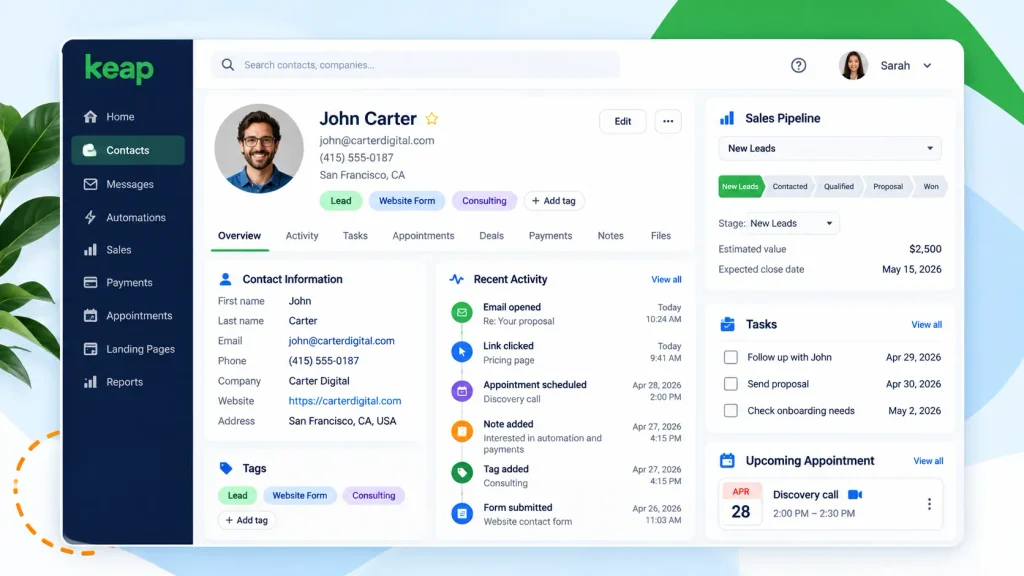
Keap’s CRM is the foundation of the platform. It gives small businesses a central place to store contact information, track customer activity, manage leads, and follow opportunities through the sales pipeline.
Contact Management
Keap lets you organize customer and prospect information in one place. You can track contact details, interactions, sales activity, and other information needed to manage ongoing customer relationships.
This is particularly useful for businesses that need more than a basic contact database. Instead of simply storing customer information, Keap connects contact records with sales, marketing, appointments, and automation workflows.
Sales Pipeline Management
Keap also provides tools for managing leads and sales opportunities through a visual pipeline. You can organize prospects by stage and use automated follow-ups to keep deals moving.
For example, a new lead can enter your CRM, receive a follow-up sequence, move through different pipeline stages, and eventually become a customer without requiring every step to be handled manually.
What I Like About Keap’s CRM
- Centralized customer and prospect information
- Visual sales pipeline management
- Connection between CRM, marketing, and automation
- Automated lead follow-up
- Useful for businesses with repeatable sales processes
The Main Trade-Off
The CRM itself is not the main reason to choose Keap. If you only need contact management and a simple sales pipeline, there are less expensive and simpler CRM options available.
Keap becomes more compelling when you want the CRM to work together with marketing automation, email and SMS, appointments, invoicing, payments, and other business processes.
Keap Marketing Automation Review
Marketing automation is one of Keap’s strongest features. The platform lets you create workflows that automatically trigger actions when a contact takes a specific step, such as filling out a form, booking an appointment, making a purchase, or reaching a particular stage in the sales process.
Easy Automations
Keap’s Easy Automations are designed for common marketing and follow-up tasks without requiring a complex workflow.
For example, you can create an automation that:
- Captures a new lead.
- Adds the contact to an automation.
- Sends a follow-up email.
- Creates a task for a sales representative.
- Continues the follow-up based on the contact’s actions.
This can save time for small businesses that regularly perform the same follow-up tasks.
Advanced Automations
For more complex processes, Keap provides more advanced automation options that let you build multi-step customer journeys.
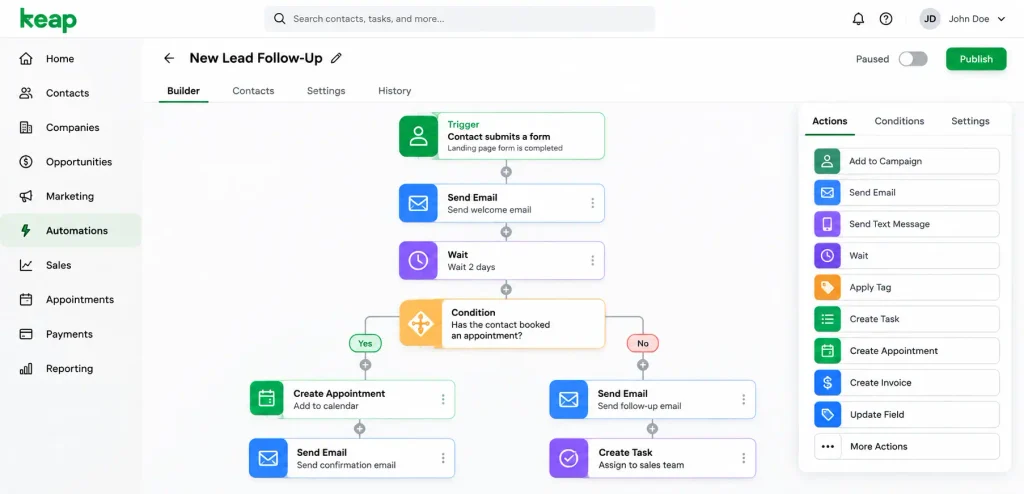
You can connect different triggers, conditions, and actions to create workflows based on how contacts interact with your business.
For example, a business could create a workflow that sends different follow-up messages depending on whether a prospect books an appointment, responds to a follow-up, or moves to another stage of the sales pipeline.
Keap Automation Builder
Keap uses a visual workflow builder to help users create and manage these processes. The visual approach makes it easier to understand how a contact moves through an automated customer journey.
The main advantage is that CRM, marketing, sales, and other business actions can be connected within the same workflow rather than managed through several separate tools.
What I Like About Keap’s Automation
- Visual workflow building
- Automated lead follow-up
- Connection between CRM and marketing activities
- Support for multi-step customer journeys
- Useful for repetitive sales and marketing processes
The Main Trade-Off
Keap’s automation capabilities are powerful, but they also add complexity. Businesses with simple follow-up needs may find a basic email automation tool easier to set up.
The more advanced your workflows become, the more time you may need to spend planning, testing, and maintaining them.
Keap Email and SMS Marketing
Keap combines email marketing and text messaging with its CRM and automation tools. Instead of managing email campaigns and customer texts in separate systems, businesses can use contact data and customer activity to trigger communications from the same platform.
This can be useful for small businesses that need both longer-form email communication and faster, action-oriented text follow-up.
Keap email marketing
Keap includes tools for creating marketing emails, newsletters, broadcasts, and automated nurture sequences. Its email builder includes customizable templates, while segmentation helps businesses send more relevant messages to specific groups of contacts.
Email campaigns can also be connected to customer behavior. For example, a new lead can be automatically tagged and segmented after submitting a form, followed by a personalized welcome email or a longer nurture sequence.
Keap also provides A/B testing, reporting, and analytics to help businesses evaluate email campaign performance.
Keap text marketing
Keap’s text marketing tools are designed to complement email rather than replace it. Businesses can trigger automated texts based on contact actions and use text messages for reminders, follow-ups, promotions, reviews, and referrals.
For example, a business could:
- Send an automated text after a lead submits a form
- Remind a customer about an upcoming appointment
- Follow up after a purchase
- Send a payment or event reminder
- Request a review or referral after a purchase
- Send a promotional text to a segmented audience
Keap also supports text broadcasts, allowing businesses to send messages to selected groups of contacts. Contacts can be segmented using tags so that different audiences receive more relevant messages.
Email vs. SMS: how Keap combines both
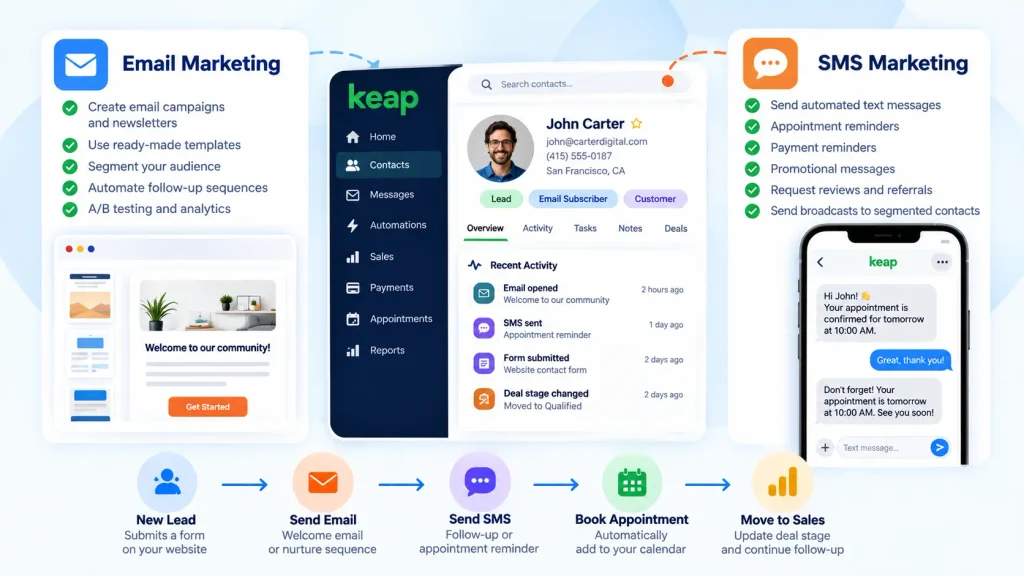
The main advantage is that email and SMS can be connected to the same CRM and automation workflows.
For example, a simple customer journey could look like this:
New lead → Welcome email → SMS follow-up → Appointment reminder → Sales follow-up
Email can be more suitable for newsletters, educational content, promotions, and longer messages. SMS can be more useful for reminders, short follow-ups, appointment notifications, and time-sensitive communication.
SMS limitations to consider
Keap’s text marketing is not available everywhere. Automated marketing texts and broadcasts through the Keap Marketing Number are currently available only in the United States. One-to-one texting through Keap Business Line is available in the United States and Canada.
Text marketing also uses monthly message credits depending on the Keap plan. Once the included credits are used, additional marketing texts are billed at $0.015 per delivered text message.
This means businesses using SMS heavily should consider both their geographic availability and expected message volume when calculating the overall cost.
Our take on Keap email and SMS marketing
Keap’s main strength here is the connection between communication, CRM data, and automation. Email and text messages can be triggered by customer actions instead of being managed as isolated campaigns.
For a service business that depends on lead follow-up, appointments, sales conversations, and repeat business, having email and SMS connected to the CRM can simplify the customer journey.
However, businesses that only need a simple newsletter tool may not need Keap’s broader CRM and automation functionality. The value becomes clearer when email and SMS are part of a larger sales and customer follow-up process.
Keap Invoicing, Payments, and Appointments
Keap goes beyond CRM and marketing automation by including invoicing, payment processing, and appointment scheduling. These tools are connected to customer records and automation workflows, which can be particularly useful for service businesses that manage leads, meetings, quotes, and payments as part of the same customer journey.
Invoicing and quotes
Keap lets businesses create and send quotes and invoices directly from the platform. Quotes can be sent to prospects or customers, and businesses can turn accepted quotes into invoices. Keap also supports one-time and recurring invoices for customers who are billed on a regular schedule.
This can reduce the need to move customer information between a CRM and a separate invoicing system.
For example, a service business could capture a lead, move the opportunity through its sales pipeline, send a quote, convert the quote into an invoice, and then track the payment from the same customer record.
Payment Processing
Keap supports payments through its native payment solution in the U.S. and also connects with third-party payment processors. Payment tools can be used with invoices, checkout forms, and other sales processes.
Payment activity can also be connected to automation. For example, a business can send a reminder when an invoice becomes overdue or trigger a follow-up after a customer completes a payment.
This connection between payments and automation is one of Keap’s more useful features for businesses that regularly sell services or products.
Keep in mind that payment processing fees still apply depending on the payment processor and payment method used. For the current rates, see our Keap Pricing 2026 guide.
Appointment scheduling
Keap includes a native appointment scheduling tool that lets businesses create appointment types, set availability, and allow leads or customers to book meetings through a scheduling link.
Keap can also connect with Google and Outlook calendars, helping businesses keep appointment availability synchronized with their existing calendars.
Appointments can be connected to automation as well. For example, when someone books a meeting, Keap can send an automated reminder or start a follow-up workflow. Appointment-related actions can also be used when meetings are canceled or rescheduled.
How these features work together
The real advantage is not simply having invoicing, payments, and scheduling tools in the same dashboard. It is the ability to connect these activities with CRM and automation.
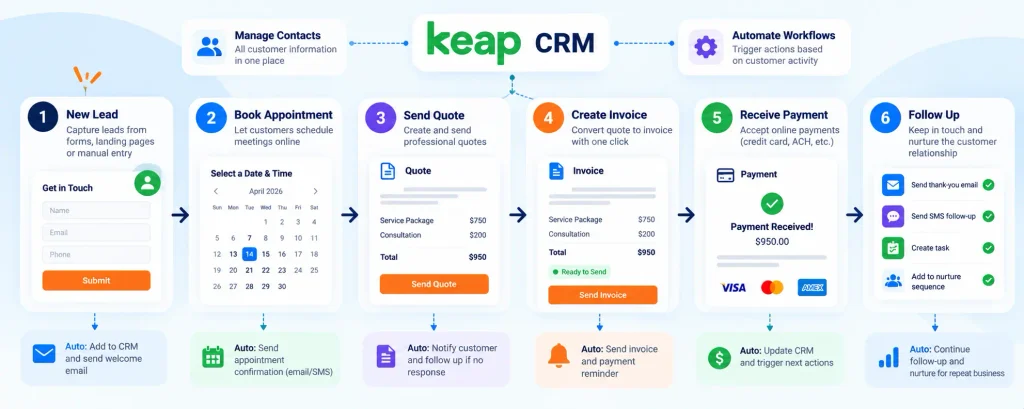
A typical service-business workflow could look like this:
New lead → Appointment booked → Quote sent → Invoice created → Payment received → Follow-up → Thank-you message
Each step can be connected to the customer’s CRM record and, where supported, used to trigger the next action.
This can be especially useful for consultants, coaches, agencies, professional services, and other businesses where the sales process includes meetings, quotes, invoices, and follow-up.
Our take on Keap’s sales and payment tools
Keap’s invoicing, payments, and appointment features make the platform broader than a traditional CRM or email marketing tool.
The main benefit is having sales, customer information, scheduling, billing, and follow-up connected in one system. The trade-off is that businesses that already have reliable accounting, scheduling, or payment tools may not need every feature included in Keap.
If your business regularly moves customers from lead to appointment to payment, these connected workflows can be more valuable than using several disconnected tools.
Keap Integrations
Keap is designed to work alongside the other software tools a small business already uses. Its integrations can connect customer data, lead information, ecommerce activity, scheduling, payments, and other business processes with the Keap CRM.
Keap currently promotes more than 5,000 app connections through Zapier, while also offering certified integrations and an open API for custom connections.
Zapier integrations
Zapier is one of the main ways to connect Keap with third-party applications. Businesses can connect Keap with thousands of other apps and create automated workflows without building a custom integration from scratch.
For example, a business could connect Keap with tools such as:
- Calendly for appointment scheduling
- Shopify for ecommerce activity
- Typeform for lead capture
- Facebook for lead generation
- Eventbrite for event registrations
- Acuity for scheduling
The exact workflow depends on the connected application and the triggers and actions available through the integration.
Native and certified integrations
Keap also supports integrations beyond Zapier. Its integration ecosystem includes connections with commonly used business applications, while Keap-certified partners can create specialized integrations for specific business requirements.
Keap’s official documentation also lists native integrations with tools such as Gmail, Outlook, QuickBooks, Zoom, and BigCommerce. Other applications, including Typeform, Calendly, and Shopify, can be connected through Zapier.
Custom integrations with the Keap API
For businesses that need a more customized setup, Keap provides an open API. Developers can use the API to build connections with applications that do not have a suitable existing integration.
Keap provides REST API documentation and developer resources, allowing businesses to create custom connections for specialized workflows.
This can be useful when a business has internal software, a specialized application, or a workflow that cannot be handled effectively through a standard integration.
What can Keap integrations automate?
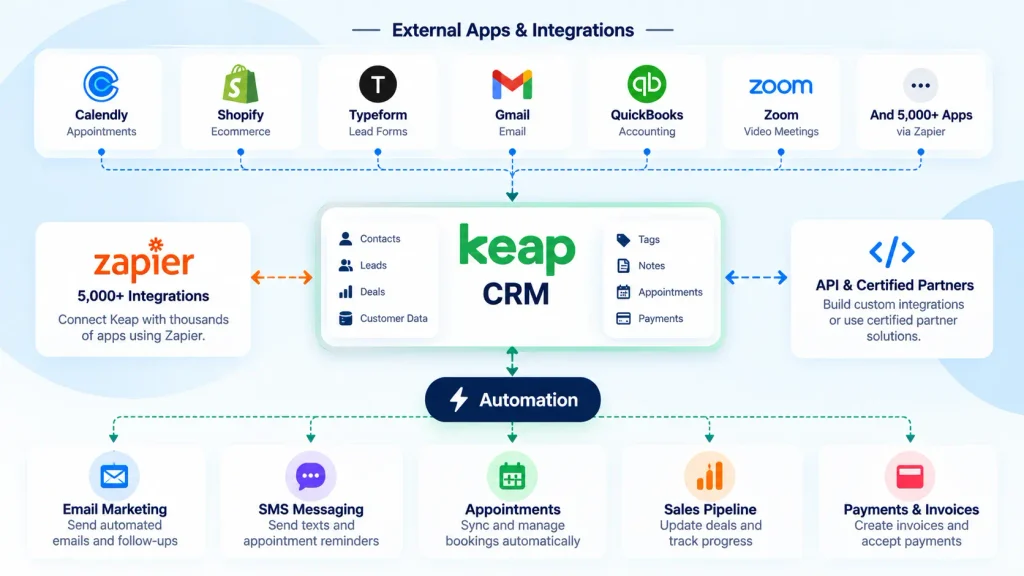
Integrations can be used to move information between different parts of a business without manually entering the same data multiple times.
For example:
Lead form → Keap CRM → Automated follow-up → Sales pipeline → Appointment → Payment
A lead captured through an external form can enter Keap automatically, trigger a follow-up sequence, create or update a sales opportunity, and continue through the customer journey.
Ecommerce integrations can also transfer order and payment information between an online store, CRM, and other business systems.
Our take on Keap integrations
Keap’s integration ecosystem is one of the more important parts of the platform because it allows the CRM and automation features to work with the tools a business already uses.
For most small businesses, Zapier provides a straightforward way to connect Keap with a wide range of applications. Businesses with more specific technical requirements can also explore certified integrations or the open API.
If you want to see the available integrations in more detail, read our complete Keap Integrations guide and see how native integrations, Zapier, and custom connections work.
Keap Ease of Use
Keap brings CRM, sales, marketing, scheduling, payment, and automation tools into one platform. This can make the system more efficient once it is configured, but new users may need some time to understand how the different parts work together.
Keap has also made interface and usability improvements, particularly around its Automation Builder and navigation. The updated builder uses a more guided experience and a simpler “When/Then” approach for creating workflows.
Getting started with Keap
Getting started involves more than simply adding contacts. Depending on how you plan to use the platform, you may need to configure your CRM, contact fields, pipelines, automations, email settings, appointments, payment options, and integrations.
Keap also provides onboarding resources and one-on-one assistance to help new customers configure the platform and understand its main features.
This setup process makes sense for an all-in-one platform, but it is also one reason Keap can feel more involved than a basic CRM or email marketing tool.
The Automation Builder
The Automation Builder is one of the most important parts of Keap’s usability.
The visual workflow interface uses When triggers and Then actions. You can select what starts a workflow, choose what happens next, and connect additional actions to build a customer journey.
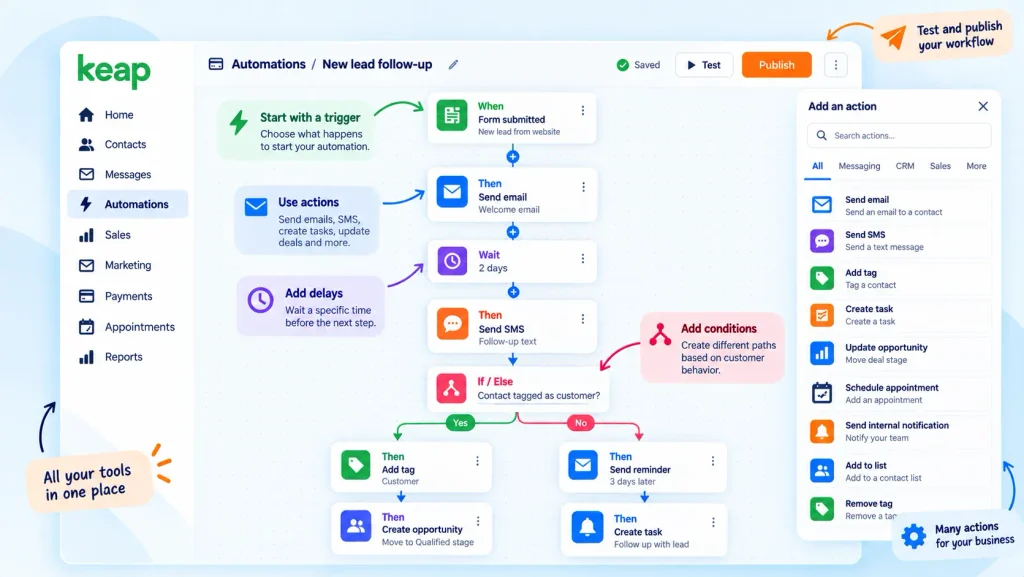
Keap also provides pre-built automation templates for common business processes. These templates can give new users a starting point instead of requiring them to build every workflow from scratch.
Is Keap easy to learn?
For basic tasks, Keap can be relatively straightforward once you understand the main navigation and CRM structure.
The learning curve becomes steeper when you start building more advanced workflows involving multiple triggers, conditions, delays, email sequences, SMS messages, sales stages, appointments, and payments.
In other words, Keap’s learning curve depends largely on how much of the platform you plan to use. A business using basic CRM and follow-up features may have a simpler setup, while a business building complex automation systems will need more time for configuration and testing.
What we like about Keap’s usability
- Visual automation builder: Workflows can be built visually instead of relying on code.
- When/Then logic: The basic automation structure is easy to understand.
- Pre-built templates: Templates can reduce the amount of work required to create common workflows.
- Centralized dashboard: CRM, sales, marketing, appointments, and payments are accessible from the same platform.
- Guided experience: Keap has added explanations and alerts to help users build and troubleshoot automations.
What can make Keap harder to use?
The main challenge is the number of features available. Keap is not just a contact database or email marketing tool, so there are more settings and processes to understand.
Businesses that want to build sophisticated automations should expect an initial setup period. Workflows should also be tested carefully before being used with real customers, especially when they involve payments, appointment reminders, or multiple communication channels.
Overall, Keap is easier to approach step by step rather than trying to configure the entire platform at once.
Keap Customer Support
Customer support is an important part of the Keap experience because the platform combines CRM, marketing automation, sales, appointments, payments, and other business tools.
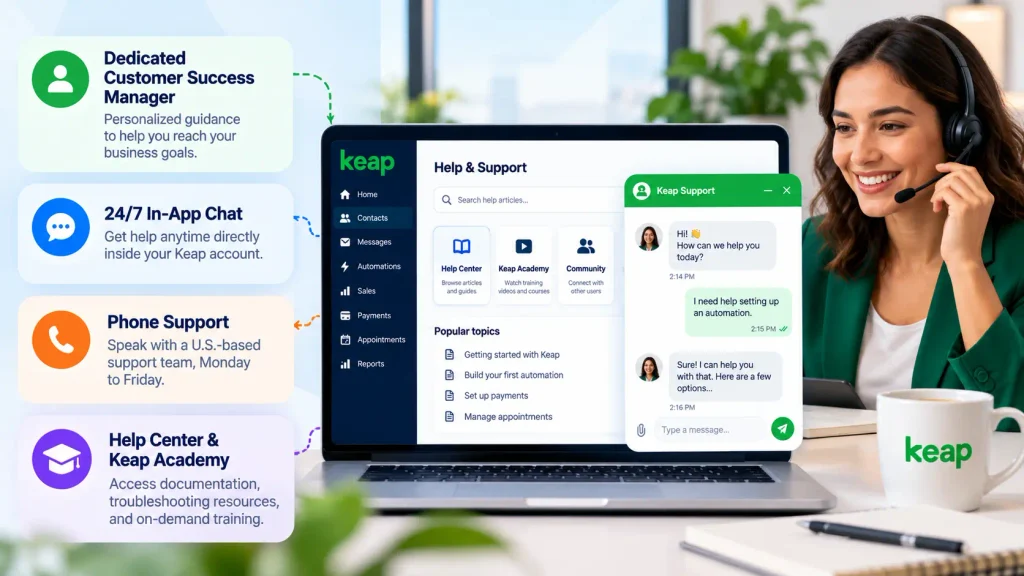
Keap currently provides several support channels, including U.S.-based phone support, 24/7 chat support inside the Keap app, a dedicated Customer Success Manager, a Help Center, and Keap Academy for ongoing training. :contentReference[oaicite:2]{index=2}
Phone and chat support
Keap provides customer support by phone during business hours, Monday through Friday. Its support team can help with product questions, technical issues, and problems related to the platform.
Chat support is available 24/7 directly inside the Keap application, giving customers an option when they need help outside regular phone-support hours.
Keap also publishes international contact information and regional support hours for customers outside the United States.
Dedicated Customer Success Manager
Keap includes access to a dedicated Customer Success Manager who can help customers work toward their business goals and find relevant resources.
This can be particularly useful when you need help with more than basic technical questions, such as understanding how to structure your CRM, automation workflows, or customer processes.
Help Center and training
Keap provides a Help Center with product documentation and troubleshooting resources. Customers can also use Keap Academy for on-demand courses and training related to the platform and business automation.
These resources can be particularly useful for businesses that want to learn the platform without relying entirely on customer support.
Implementation and onboarding
Keap also offers implementation services designed to help businesses configure the platform, migrate data, and develop an automation strategy.
This is relevant because Keap has a broader setup process than a basic CRM or email marketing tool. Businesses moving contacts, forms, automations, or sales processes from another platform may benefit from structured onboarding.
However, implementation services and ongoing customer support serve different purposes. Support helps with using and troubleshooting the product, while implementation services focus on getting the system configured and operational.
Our take on Keap customer support
Keap provides a broad support structure for a small-business CRM, with phone support, 24/7 in-app chat, a dedicated Customer Success Manager, documentation, and training resources.
The biggest advantage is that support extends beyond basic technical troubleshooting. Businesses can also access resources designed to help them learn the platform and build their automation workflows.
If you’re considering Keap, this support structure is worth considering as part of the overall cost, particularly if you expect to need help during implementation or while building more advanced automations.
Keap Pros and Cons
Keap is a powerful all-in-one CRM and business automation platform, but it is not the right fit for every small business.
Its biggest advantage is the ability to connect CRM, marketing automation, sales, appointments, invoicing, payments, and customer communication in one system. The main drawbacks are its higher starting cost, implementation requirements, and the learning curve that comes with its broader feature set.
Keap Pros
- All-in-one platform: Keap combines CRM, marketing automation, email, SMS, sales pipeline management, appointments, invoicing, and payments in one platform.
- Powerful automation: You can automate lead follow-up, customer communication, sales processes, and other repetitive tasks using visual workflows.
- Strong CRM and automation connection: Customer information, sales activity, marketing campaigns, and automations can work together instead of being managed separately.
- Built-in sales and payment tools: Quotes, invoices, checkout forms, recurring payments, and appointment scheduling are available within the platform.
- Extensive integrations: Keap supports thousands of app connections through its integration ecosystem, including more than 5,000 connections through Zapier.
- Useful for service businesses: Consultants, coaches, agencies, and other service businesses can benefit from connecting leads, appointments, follow-up, and payments.
- Dedicated support resources: Keap provides phone support, 24/7 in-app chat, Customer Success Managers, training, and implementation services.
Keap Cons
- High starting price: Keap starts at $299 per month when billed monthly, or $2,988 per year, which is significantly more than many basic CRM and email marketing tools.
- Implementation is required: Keap requires implementation services, adding an additional cost for businesses getting started with the platform.
- Steeper learning curve: The large number of CRM, automation, sales, marketing, and payment features can take time to configure and learn.
- SMS limitations: Automated text marketing and text broadcasts are currently available only in the United States, while one-to-one text messaging through Keap Business Line is available in the U.S. and Canada.
- Additional costs can add up: Extra users, higher SMS usage, payment processing, and implementation can increase the overall cost beyond the base subscription.
- May be too much for simple needs: Businesses that only need a basic CRM, email newsletter tool, or simple contact database may not need everything Keap provides.
- Annual cancellation fee: Customers on an annual contract may be charged a $299 early termination fee if they cancel before the end of the one-year term.
Is Keap Worth It?
Keap is most compelling for small businesses that can take advantage of its automation and all-in-one approach.
If your business needs CRM, automated follow-up, email and SMS marketing, appointments, invoicing, payments, and integrations in one system, the higher price can be easier to justify.
However, if you only need a basic CRM or email marketing platform, Keap may be more expensive and more complex than necessary.
Our verdict: Keap is a strong choice for small businesses that need serious automation, but its cost makes it better suited to businesses that will actually use its broader feature set.
Who Should Use Keap?
Keap is designed primarily for growing small businesses that want to connect CRM, sales follow-up, marketing automation, appointments, payments, and customer communication in one platform.
It can be particularly useful for service-based businesses and other companies with repeatable sales and customer-management processes.
Keap may be a good fit if you:
- Run a service-based business: Consultants, coaches, agencies, professional service providers, and similar businesses can use Keap to manage leads, appointments, follow-up, quotes, invoices, and payments from one system.
- Manage a steady flow of leads: Keap can automatically follow up with new leads, move opportunities through sales pipelines, and trigger emails or text messages based on customer actions.
- Need marketing and sales automation together: If your business relies on lead nurturing, appointment booking, sales follow-up, and customer communication, Keap connects these processes through its automation tools.
- Want CRM and payments connected: Businesses that send quotes, invoices, collect payments, and then trigger customer follow-up can manage these activities within the same platform.
- Use appointments as part of your sales process: Keap includes appointment scheduling and can connect bookings with automated reminders and follow-up workflows.
- Want to reduce repetitive administrative work: Keap’s automation tools can handle recurring processes such as lead follow-up, appointment reminders, invoice reminders, and post-purchase communication.
Who may want to consider an alternative?
Keap may not be the right fit for every business. You may want to compare other platforms if:
- You only need a basic CRM: If you mainly need contact storage and simple deal tracking, a lighter CRM may provide the functionality you need without the broader automation and business tools.
- You only send newsletters: Businesses that mainly need newsletters and basic email campaigns may find a dedicated email marketing platform simpler.
- You already have separate tools that work well: If your CRM, scheduling, invoicing, payment, and email systems are already well integrated, replacing them with an all-in-one platform may not provide enough additional value to justify the migration.
- You want a very simple setup: Keap combines many business functions, so configuring the platform can take more time than setting up a specialized tool with a narrower purpose.
- You need a platform built around a different business model: Keap focuses on small-business CRM and sales and marketing automation. Businesses with highly specialized enterprise requirements may need to compare platforms designed specifically for those workflows.
Keap is particularly relevant when…
Keap makes the most sense when several parts of your business need to work together.
For example:
Lead capture → CRM → Automated follow-up → Appointment → Sales pipeline → Quote → Invoice → Payment → Customer follow-up
If you want these processes to share the same customer data and trigger automated actions, Keap’s all-in-one approach can be valuable.
If you only need one or two of these functions, however, a specialized tool may offer a simpler and less expensive solution.
Our Take
Keap is best suited to small businesses that have outgrown basic CRM or email marketing tools and need more connected automation.
For a consultant, coach, agency, or professional service business with a steady flow of leads and repeatable sales processes, Keap can provide a useful combination of CRM, automation, communication, appointments, and payments.
For businesses with simpler requirements, the platform may provide more functionality than necessary.
Who Should Consider an Alternative?
Keap is not the best choice for every business. You may want to consider an alternative if:
- You only need a basic CRM: If you mainly need contact management and simple deal tracking, a lighter CRM may provide what you need at a lower cost.
- You mainly need email marketing: If your main goal is sending newsletters and simple email campaigns, a dedicated email marketing platform may be easier and less expensive.
- You already have a reliable tech stack: If your CRM, scheduling, invoicing, payment, and email tools already work well together, switching to Keap may not provide enough additional value to justify the migration.
- You want a very simple setup: Keap combines CRM, marketing, sales, appointments, payments, and automation. If you only need one or two of these functions, a specialized tool may be easier to manage.
- You need enterprise-level functionality: Larger organizations with complex enterprise requirements may need a platform designed for larger teams, advanced reporting, or more specialized workflows.
In short, Keap makes the most sense when you can take advantage of several of its features together. If you only need one specific function, a specialized alternative may offer better value and a simpler experience.
The Key Question to Ask
The most important question is not whether Keap has enough features. It is whether your business will actually use enough of them to justify the cost.
Ask yourself:
Would I use Keap’s CRM, automation, email or SMS, appointments, invoicing, payments, and integrations regularly?
If the answer is yes to several of these, Keap’s all-in-one approach may provide enough value to justify the higher price.
If you only need a basic CRM, simple email marketing, or one specific business tool, a more specialized platform may be a better fit.
This is the main trade-off to consider before choosing Keap: paying more for a connected system can make sense when it replaces several tools and reduces manual work, but not when most of its features will go unused.
Keap vs Alternatives
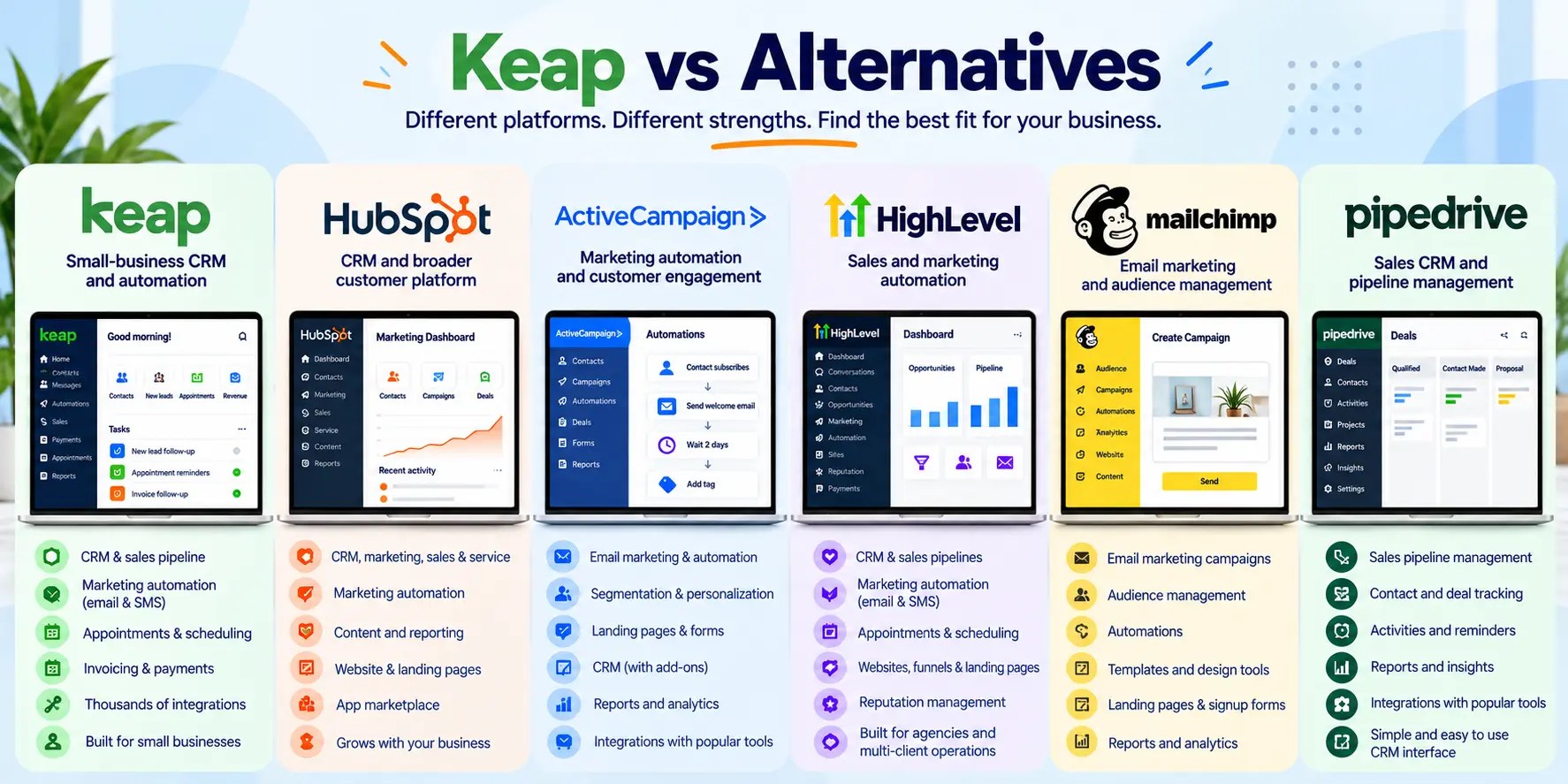
Keap is not the only CRM and marketing automation platform available to small businesses. The right alternative depends on whether you prioritize all-in-one functionality, marketing automation, CRM features, simplicity, or price.
Keap vs HubSpot
Keap is focused on small businesses that want CRM, marketing automation, appointments, invoicing, payments, and customer communication connected in one platform.
HubSpot offers a broader ecosystem with separate hubs for marketing, sales, service, content, and operations. It can be a strong choice for businesses that need a highly flexible CRM ecosystem, but costs can increase as more advanced features and hubs are added.
Choose Keap if: you want an all-in-one system built around small-business sales and marketing automation.
Choose HubSpot if: you need a broader CRM ecosystem and expect more complex sales, marketing, or service requirements as your business grows.
Keap vs ActiveCampaign
ActiveCampaign is particularly focused on email marketing, customer engagement, and marketing automation. Businesses that need additional CRM, appointment, invoicing, or payment functionality may need other tools alongside it.
Choose Keap if: you want sales, marketing, CRM, appointments, and payments connected in one platform.
Choose ActiveCampaign if: your main priority is advanced email marketing and customer engagement automation.
Keap vs Mailchimp
Keap is designed as a broader CRM and business automation platform, while Mailchimp is primarily known for email marketing and audience management.
Choose Keap if: you need CRM, sales automation, appointments, payments, and customer follow-up alongside email marketing.
Choose Mailchimp if: your main requirement is creating and sending email campaigns without needing a full sales and business automation platform.
Keap vs Pipedrive
Keap combines CRM and sales pipeline management with marketing automation, appointments, invoicing, payments, and communication tools.
Pipedrive is primarily focused on CRM and sales pipeline management.
Choose Keap if: you want your CRM connected to marketing automation and other business processes.
Choose Pipedrive if: your main priority is managing sales pipelines and deals with a more focused CRM experience.
Keap vs Salesforce
Keap is designed specifically around the needs of growing small businesses.
Salesforce is a much broader CRM platform designed to support organizations with more complex sales, service, reporting, customization, and enterprise requirements.
Choose Keap if: you are a small business looking for an integrated CRM and automation platform without the complexity of an enterprise CRM.
Choose Salesforce if: your organization needs advanced customization, complex workflows, extensive reporting, or enterprise-level CRM capabilities.
Which Keap Alternative Is Right for You?
| Platform | Best for | Main strength |
|---|---|---|
| Keap | Small businesses | CRM + automation + sales + payments |
| HubSpot | Growing businesses | Broad CRM and business ecosystem |
| ActiveCampaign | Marketers | Email and marketing automation |
| Mailchimp | Email-focused businesses | Email marketing and campaigns |
| Pipedrive | Sales teams | Sales pipeline management |
| Salesforce | Larger organizations | Enterprise CRM and customization |
The key difference is not simply the number of features each platform offers. It is how those features fit together for your business.
If you want one platform to connect CRM, automation, sales follow-up, appointments, invoicing, payments, and customer communication, Keap is one of the more complete options for small businesses.
If you only need one specific function, such as email marketing or sales pipeline management, a specialized alternative may be simpler and more cost-effective.
Is Keap Worth It in 2026?
Whether Keap is worth the cost in 2026 depends on how much of the platform your business will actually use.
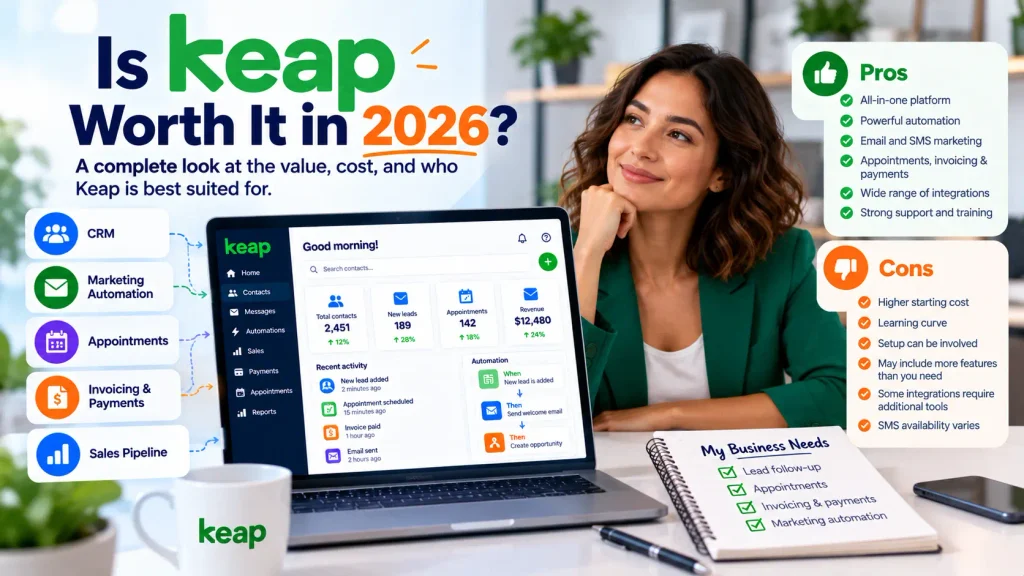
Keap currently starts at $299/month with monthly billing, or $2,988/year with annual billing. The platform combines CRM, sales pipeline management, marketing automation, email and text messaging, appointments, invoicing, payments, and integrations in one system. Keap also requires implementation services for new customers.
That makes Keap a different proposition from a basic CRM or email marketing platform. The real question is not simply whether Keap is expensive. It is whether having these connected tools in one platform can justify the total cost for your business.
Keap May Be Worth It If You Need Several Tools in One Platform
Keap can make more sense when your business needs multiple connected functions rather than a single software category.
For example, a service business may need to manage:
Lead capture → CRM → Automated follow-up → Appointment → Sales pipeline → Quote → Invoice → Payment → Customer follow-up
Keap is designed to connect these processes through its CRM and automation tools. Automations can trigger follow-up based on leads, appointments, sales activity, invoices, payments, and other customer actions.
If you would otherwise need several separate applications to manage these activities, Keap’s all-in-one approach becomes more valuable.
The Cost Is Easier to Justify When Automation Saves Time
One of the main reasons to consider Keap is not simply the number of features included. It is the amount of repetitive work you can automate.
For example, Keap can automate:
- Lead follow-up
- Appointment reminders
- Sales nurturing
- Invoice reminders
- Customer follow-up
- Email and text communication
- Repetitive sales and marketing tasks
Keap says customers who use its automation save an average of 10 hours per week. However, this figure comes from a Keap customer survey and is not a guarantee of individual results. Your actual time savings will depend on your business processes and how extensively you use automation.
For a business where employees regularly spend hours on manual follow-up and administrative tasks, automation can therefore be an important part of the cost calculation.
Keap May Not Be Worth the Cost for Simpler Requirements
The same features that make Keap comprehensive can make it unnecessary for businesses with simpler needs.
If you only need:
- A basic contact database
- Simple deal tracking
- Occasional newsletters
- Basic email automation
- A standalone appointment scheduler
- Simple invoicing
then a collection of specialized or lower-cost tools may be sufficient.
In that situation, paying for an all-in-one CRM and automation platform could mean paying for functionality your business does not use.
Consider the Total Cost, Not Just the Subscription
The advertised subscription price is not the only cost to consider.
Keap currently states that implementation services are required for new customers. These services can include strategy consulting, data import, migration, and setup assistance.
You should also consider:
- Additional user licenses
- Contact volume
- SMS usage
- Payment processing fees
- Implementation costs
- Any third-party tools or integrations you may need
For example, Keap includes two user licenses, while additional users currently cost $39/month per user. SMS usage can also require higher monthly tiers depending on your volume.
If you choose an annual contract, Keap also states that a $299 early termination fee applies if you cancel before the end of the one-year contract term.
For this reason, compare the total cost of ownership, not just the advertised monthly subscription.
So, Is Keap Worth It in 2026?
For the right small business, yes.
Keap can be worth the investment if you need CRM, marketing automation, sales follow-up, appointments, invoicing, payments, and customer communication to work together.
The value becomes especially clear when Keap can replace several separate tools and reduce repetitive manual work.
However, Keap is harder to justify if you only need a basic CRM, simple email marketing, or one specific business function. In those cases, a specialized platform may offer better value and a simpler setup.
Our Verdict
Keap is worth considering in 2026 if your business will actively use its CRM, automation, sales, and business-management features.
Its biggest strength is not any single feature. It is the ability to connect multiple parts of the customer journey in one platform.
The trade-off is cost and complexity. At $299/month before additional costs, Keap is not a budget CRM. But for a growing small business that can use its automation and all-in-one capabilities, the higher price can be justified.
If your needs are simple, choose a simpler tool. If you need several connected business processes and want to automate them, Keap can be worth the investment.
Frequently Asked Questions About Keap

Fedora writes step-by-step guides for non-technical founders, turning complex SaaS setups into clear, follow-along tutorials. She focuses on getting small business owners from sign-up to first results without the jargon.