
Keap is an all-in-one CRM and business automation platform for small businesses, but its pricing is different from many traditional SaaS tools. Instead of separate feature-based plans, Keap currently offers its full platform starting at $299/month when billed monthly, with annual billing listed at $2,988 per year.
The subscription price is only part of the calculation. Your actual Keap cost can also depend on the number of contacts and users you need, implementation services, text marketing usage, payment processing, and whether you choose monthly or annual billing. Keap currently includes two user licenses, while additional users cost $39/month each.
In this Keap Pricing 2026 guide, we’ll break down the monthly and annual pricing, contact and user costs, implementation fees, SMS charges, free trial limitations, and the potential first-year cost of using Keap.
We’ll also explain what is included in the subscription and how to calculate the real cost for your business before you sign up.
Disclosure: This article contains affiliate links. If you sign up through one of our links, we may earn a commission at no extra cost to you.
Keap Pricing at a Glance
Keap currently uses a single all-in-one pricing structure rather than separate feature-based plans. The platform starts at $299 per month when billed monthly, while annual billing is listed at $2,988 per year, equivalent to $249 per month.
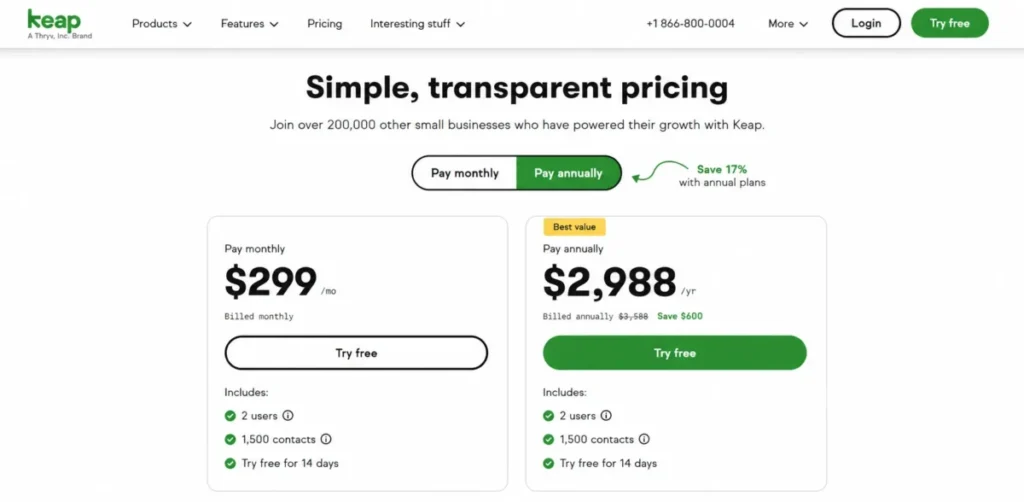
Your final cost can vary depending on the number of contacts and users you need, as well as implementation services and optional usage such as text marketing.
| Keap Pricing | Current Cost |
|---|---|
| Monthly billing | $299/month |
| Annual billing | $2,988/year ($249/month equivalent) |
| Included users | 2 users |
| Additional users | $39/month per user |
| Contacts | 1,500 contacts included; additional contacts are tiered |
| Implementation | Required; package pricing may vary. |
| Free trial | 14 days |
| Credit card for trial | Not required |
Keap’s pricing page also notes that current promotional offers may be available, so the price shown when you sign up can differ from the standard starting price.
The important point is that the $299 monthly subscription is not necessarily the total cost of using Keap. Implementation, additional users, contact volume, text marketing, and payment processing can all affect your final bill.
Want to evaluate Keap beyond its pricing? Read our Keap Review 2026 for a detailed look at its features, usability, pros, cons, and alternatives.
How Much Does Keap Cost in 2026?
Keap starts at $299 per month when you choose monthly billing. Keap also lists annual billing at $2,988 per year, which works out to $249 per month when averaged across the year.
Unlike many CRM platforms that offer separate plans for different feature sets, Keap currently positions its software as an all-in-one platform. The starting subscription includes access to its CRM, automation, email marketing, invoicing, payments, and other core business tools.
However, the subscription price is only the starting point. Your actual Keap cost can increase depending on your contact volume, additional users, implementation services, text marketing usage, and payment processing.
Monthly vs. Annual Keap Pricing
If you pay monthly, the subscription costs $299/month, which equals $3,588 over 12 months.
With annual billing, Keap lists the price at $2,988 per year, equivalent to $249/month. That means annual billing saves $600 per year compared with paying $299 every month.
| Billing option | Cost | 12-month equivalent |
|---|---|---|
| Monthly | $299/month | $3,588 |
| Annual | $2,988/year | $2,988 |
So, if you already know that you will use Keap for at least a year, the annual option has a significantly lower subscription cost. However, you should also consider implementation and other additional costs before comparing the two options.
Keap also notes that promotional offers may be available, so it’s worth checking the current pricing page before subscribing.
Keap Pricing by Number of Contacts
Keap currently includes 1,500 contacts with its starting subscription. If you need more contacts, additional contact pricing is available in tiers, with the cost per contact decreasing as your contact volume increases.
The exact cost for additional contacts depends on the number of contacts you need. Keap’s pricing page lets you enter your desired contact volume to see the applicable pricing.
A contact is an individual person stored in your Keap account. Contact records can include information such as email addresses, phone numbers, notes, conversations, payments, invoices, and other customer details.
Does Keap Charge More for More Contacts?
Yes. Your subscription cost can increase as your contact database grows.
For example, a small business with a relatively small database may pay less for contacts than a company managing a much larger customer list. The exact amount depends on the contact volume selected when you configure your Keap subscription.
Because Keap can update its contact tiers and promotional pricing, it’s better to check the current pricing calculator rather than rely on an outdated fixed contact table.
Tip: Before subscribing, enter your expected number of contacts on Keap’s pricing page. This gives you a more accurate estimate of your monthly or annual cost than using the $299 starting price alone.
The important point is that $299/month is a starting price, not necessarily the final subscription cost for every business. Contact volume, additional users, implementation, text marketing, and payment processing can all affect your total cost.
Keap User Pricing: How Much Do Extra Users Cost?
Keap includes 2 user licenses with its subscription. If your business needs additional team members to access the software with their own login, each extra user costs $39 per month.
A user is someone who has their own username and password and is authorized to access the Keap account.
| Users | Additional monthly cost |
|---|---|
| 2 users | Included |
| 3 users | +$39/month |
| 4 users | +$78/month |
| 5 users | +$117/month |
For example, if you need four users, your subscription would start with the base Keap price plus $78/month for the two additional users.
This means businesses with larger teams should include user licenses when calculating their real Keap cost. The $299/month starting price covers the software subscription, but additional team members can increase the monthly total.
You can add more users through your Keap account by contacting your customer success manager or Keap support.
Keap Implementation Cost and Setup Fees
Keap’s subscription price is not the only upfront cost to consider. The company currently requires an implementation package for new customers, designed to help businesses configure the platform, migrate data, build automations, and get started with the software.
Keap’s implementation page currently displays a $500 one-time investment, reduced from a listed regular price of $1,500. Because promotional pricing can change, you should confirm the current price with Keap before purchasing.
What Does Keap Implementation Include?
The current implementation package includes several services designed to help businesses get their account up and running:
- A business mapping session
- 2 automations launched for you
- Basic data import
- Up to 15 hours of migration services
- Weekly calls with an implementation strategy manager during the first month
- Monthly strategy calls during months 2–6
- Quarterly strategy calls during months 7–12
- Integration of up to 2 third-party tools
Keap says its implementation services can include migrating important assets such as email templates, landing pages, web forms, automations, and sales pipelines from a previous platform.
Is Keap Implementation Mandatory?
Yes. Keap currently states that its implementation services are required. The company explains that the program is intended to provide strategy, training, support, data migration, and done-for-you setup so businesses can start using the platform more effectively.
This means you should not calculate your first-year Keap cost using the subscription price alone.
For example, using the currently displayed implementation price:
$2,988 annual subscription + $500 implementation = $3,488 before other usage-based or optional costs.
This $3,488 figure is therefore a useful example of the potential first-year starting cost, not a permanent fixed price. The implementation promotion may change, and additional costs can apply depending on your contacts, users, text marketing, and payment processing needs.
What Is Included in the Keap Price?
Keap’s current pricing structure is designed to give customers access to the full software platform rather than separating features into multiple feature-based plans. The starting subscription includes a broad set of CRM, sales, marketing, and business automation tools.
Here are some of the main features included in the Keap platform:
| Feature | Included in the platform? |
|---|---|
| CRM and contact management | Yes |
| Sales pipeline | Yes |
| Email marketing | Yes |
| Marketing automation | Yes |
| Forms and lead capture | Yes |
| Appointment scheduling | Yes |
| Quotes and invoices | Yes |
| Checkout forms | Yes |
| Recurring payments | Yes |
| Sales and business automation | Yes |
| Mobile app | Yes |
| AI Content Assistant | Yes |
| AI Automation Assistant | Yes |
Keap also supports text marketing, payment processing, and third-party integrations. However, some of these services can involve additional usage-based or processing costs depending on how you use them.
What Is Not Included in the Base Price?
The $299/month starting price should not be treated as an all-inclusive final bill.
Additional costs can apply to:
- Extra user licenses
- Higher contact volumes
- Implementation services
- Text marketing usage beyond the included allowance
- Payment processing fees
- Certain additional services or usage-based charges
For example, Keap currently includes 2 user licenses, while additional users cost $39/month each. Text marketing also has included monthly credits, with additional tiers and overage charges depending on usage.
Payment processing is also separate from the software subscription. If you accept payments through Keap or a connected payment processor, the applicable transaction fees are charged separately.
This is why the best way to estimate your Keap cost is to start with the base subscription and then add the costs that apply to your business.
Keap SMS and Text Marketing Costs
Keap includes a basic text marketing allowance with its subscription, but businesses that send a higher volume of messages may need to pay for a larger text marketing tier.
The current Tier 1 allowance includes 500 text messages and 100 voice minutes per month. Businesses can upgrade to higher tiers when they need more messaging capacity.
| Text Marketing Tier | Monthly Price | Messages | Voice Minutes |
|---|---|---|---|
| Tier 1 | Included | 500 | 100 |
| Tier 2 | $24/month | 1,000 | 300 |
| Tier 3 | $39/month | 2,500 | 500 |
| Tier 4 | $79/month | 5,000 | 800 |
| Tier 5 | $139/month | 10,000 | 1,000 |
| Tier 6 | $279/month | 25,000 | 2,000 |
If you exceed your selected messaging allowance, Keap currently charges $0.015 per additional text message and $0.01 per additional voice minute.
Keap also offers optional messaging add-ons, including an additional 500 text messages for $6/month and a local number for $10/month.
Is Keap Text Marketing Available Everywhere?
Not currently. Keap states that automated text messages and text broadcasts are currently available only in the United States. One-to-one text messaging through the Keap Business Line is available in the United States and Canada.
Therefore, if SMS marketing is an important part of your business, check the current availability and pricing for your location before choosing Keap.
Keap Payment Processing Fees
Keap’s subscription does not include payment processing at no additional cost. If you accept customer payments through Keap, transaction fees apply separately from your monthly software subscription. Keap states that the applicable fees depend on the payment processor you use.
Keap Pay Processing Fees
Keap’s native payment solution, Keap Pay, currently has no monthly fee. For card payments, Keap lists a processing rate of 2.99% + $0.30 per transaction.
| Payment method | Current fee |
|---|---|
| Credit and debit cards | 2.99% + $0.30 per transaction |
| Monthly fee | $0 |
| Refund fee | $0.30 per refund |
| ACH | 1%, capped at $10 |
Keap Pay currently supports card payments including Visa, Mastercard, Discover, and American Express. ACH processing is listed as coming soon on Keap’s current payment page.
What If You Use Another Payment Processor?
Keap also supports third-party payment processors such as Stripe, PayPal, and Eway. In that case, the processor’s own transaction fees apply. Keap states that these fees are separate from the Keap software subscription.
For example, if your business processes $10,000 in card payments through Keap Pay, a 2.99% processing rate plus $0.30 per transaction would be deducted from the payments processed. The exact total depends on the number and value of your transactions.
This means payment processing should be treated as a separate operating cost when calculating the total cost of using Keap.
Keap Free Trial: What Is Included?
Keap currently offers a 14-day free trial with no credit card required, giving you a chance to explore the platform before committing to a paid subscription.
The trial includes access to most of Keap’s core software features, but it is not identical to the paid version.
| Free Trial Feature | Included? |
|---|---|
| Trial length | 14 days |
| Credit card required | No |
| CRM access | Yes |
| Automation tools | Yes |
| Email sending | Yes, limited to 25 emails |
| Payment processing | No |
| Send or receive texts | No |
What Are the Keap Free Trial Limitations?
The most important limitation is email sending. Keap currently allows a maximum of 25 emails during the free trial, and you must set up DKIM authentication before sending them.
You also cannot process payments or send and receive text messages during the trial.
These restrictions mean the free trial is best used to explore Keap’s interface, CRM, automation builder, contact management, and general workflow rather than running a full marketing campaign.
Do You Need a Credit Card for the Keap Free Trial?
No. Keap does not require a credit card to start the 14-day trial.
That makes the trial a practical way to test whether Keap’s CRM and automation workflow fits your business before paying for the subscription and required implementation services.
The Real Cost of Keap in the First Year
The advertised Keap price does not tell the whole story. To estimate what you could actually spend during your first year, you need to consider the annual subscription, implementation, additional users, contact volume, text marketing, and payment processing.
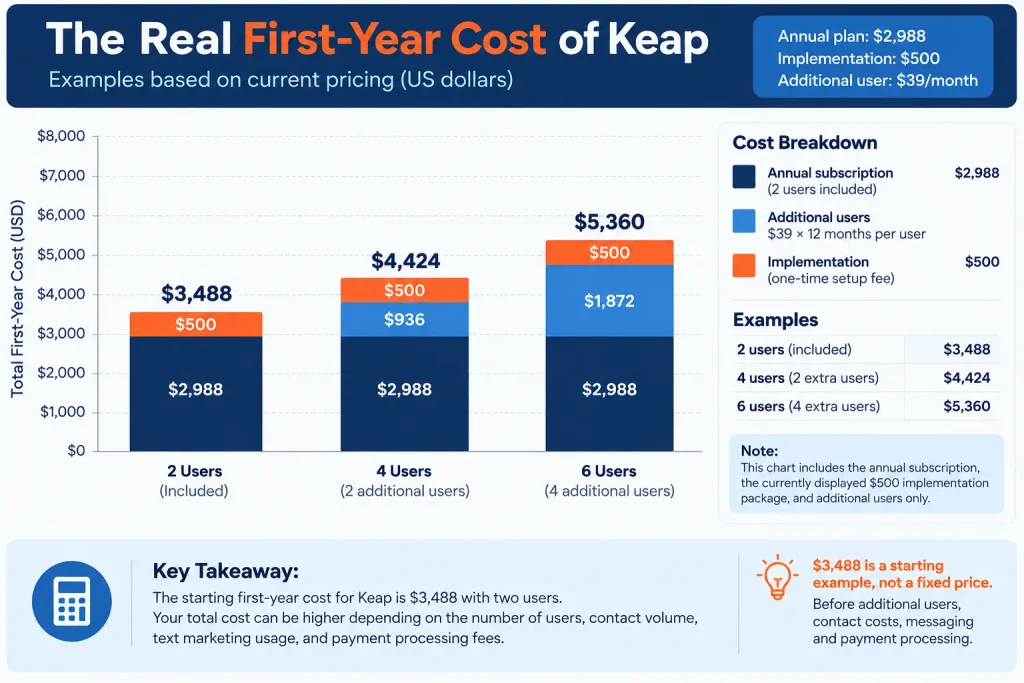
For a business using the standard annual subscription and the currently displayed $500 implementation package, the starting calculation looks like this:
| Cost | First-year estimate |
|---|---|
| Annual Keap subscription | $2,988 |
| Implementation | $500 |
| Base first-year cost | $3,488 |
| Additional users | Depends on team size |
| Additional contacts | Depends on contact volume |
| Text marketing | Depends on usage |
| Payment processing | Depends on transaction volume |
Example: A Small Business With Two Users
If you only need the two included user licenses and stay within the base contact and messaging allowances, your initial calculation would be:
$2,988 annual subscription + $500 implementation = $3,488 for the first year.
This does not include payment processing fees or any additional usage that may apply to your account.
Example: A Business With Additional Users
Suppose you need four users instead of two. Keap includes two users, so the two additional licenses would add:
2 × $39 × 12 = $936 per year
That would bring the subscription and currently displayed implementation cost to:
$2,988 + $936 + $500 = $4,424 for the first year.
This is only an example. Your actual cost can be higher or lower depending on your contact volume, messaging needs, and other services.
Why the Real Cost Matters
The important takeaway is that the $299/month starting price should not be treated as the complete cost of Keap.
For a small business, the most useful calculation is:
Annual subscription + implementation + additional users + contact costs + messaging costs + payment processing = estimated first-year cost
Because Keap can change promotional offers and pricing, use the current Keap pricing page to confirm the exact amount before purchasing.
Is Keap Expensive Compared With Separate Tools?
At first glance, Keap can look expensive compared with a basic CRM or email marketing platform. The starting subscription is $299/month, and new customers also need to account for implementation costs.
However, comparing Keap with a single low-cost CRM does not always give you the full picture.
Keap combines CRM, marketing automation, email marketing, appointments, sales pipelines, invoicing, payments, and other business tools in one platform.
For a small business, the alternative may be to pay for several separate tools and connect them together.
| Approach | Potential advantage | Potential drawback |
|---|---|---|
| Keap all-in-one | CRM, automation, marketing, sales and payments in one platform | Higher starting price |
| Several separate tools | Lower entry price for individual tools | Multiple subscriptions and integrations |
| Basic CRM + email tool | Can be cheaper for simple needs | Less advanced automation and fewer business tools |
The question is therefore not simply whether Keap is expensive. The better question is whether you would actually use enough of its features to justify the cost.
When Keap Can Make Financial Sense
Keap can make more sense for a small business that needs several connected systems, such as:
- CRM and contact management
- Lead follow-up and sales automation
- Email marketing
- Appointment scheduling
- Quotes and invoices
- Payment collection
- Automated customer follow-up
If you would otherwise pay for several separate platforms to cover these functions, an all-in-one solution can reduce the number of tools you need to manage.
On the other hand, if you only need a basic CRM or simple email marketing, Keap may be more software than you actually need.
For a broader comparison of Keap’s features and alternatives, see our Keap Review 2026.
How to Calculate Your Keap Cost
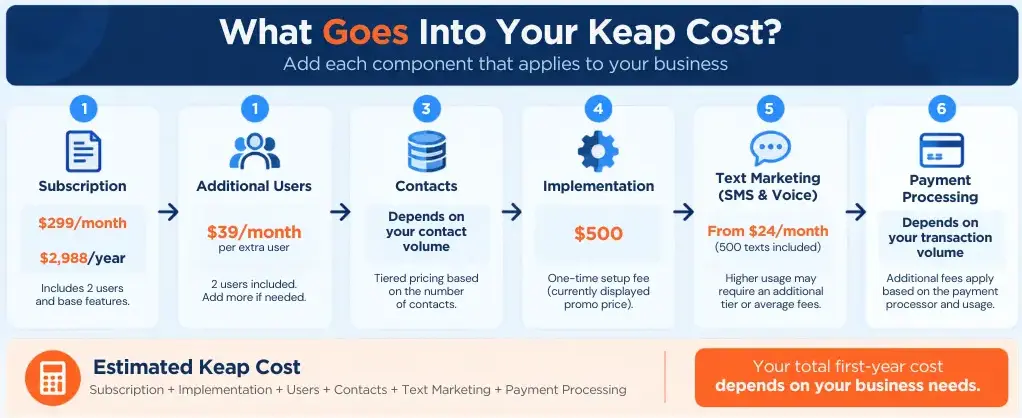
The easiest way to estimate your Keap cost is to start with the subscription price and then add the expenses that apply to your business.
Use this simple formula:
Estimated Keap cost = subscription + implementation + additional users + contact costs + text marketing + payment processing
Step 1: Choose Your Billing Option
Start with either:
- $299/month for monthly billing
- $2,988/year for annual billing
If you already know you will use Keap for a full year, annual billing has a lower subscription cost.
Step 2: Add Additional Users
Keap includes two user licenses.
If you need more users, add $39/month for each additional user.
For example:
2 additional users × $39 × 12 = $936 per year
Step 3: Check Your Contact Volume
Enter the number of contacts you expect to manage on Keap’s current pricing page.
Your contact volume can affect the total subscription cost, so don’t assume that the $299 starting price will apply to every business.
Step 4: Add Implementation
Keap currently requires implementation for new customers.
The implementation page currently displays a promotional price of $500, compared with a listed regular price of $1,500. Check the current offer before purchasing because promotional pricing can change.
Step 5: Estimate Your Messaging Costs
If you use text marketing, check how many messages and voice minutes your business is likely to use each month.
Keap includes a basic messaging allowance, while higher usage can require an additional monthly tier or generate overage charges.
Step 6: Consider Payment Processing
If you use Keap to accept customer payments, include payment processing fees in your calculation.
These fees are separate from the Keap software subscription and depend on the payment processor and transaction volume.
A Simple Keap Cost Example
For a small business with two users using annual billing and the currently displayed $500 implementation package:
$2,988 annual subscription + $500 implementation = $3,488 first-year starting cost
This is only a starting estimate. Your actual cost can increase if you need additional users, have a larger contact database, use additional text marketing, or process payments through Keap.
Before subscribing, review your expected contacts, users, messaging volume, and payment requirements to get a realistic estimate of your total Keap cost.
Frequently Asked Questions About Keap Pricing
If you want a broader evaluation of Keap’s features, usability, pros, cons, and alternatives, read our Keap Review 2026.

James runs head-to-head tool comparisons, testing each option on the real tasks small businesses care about. He digs into setup, usability, and whether a tool delivers on its promises.