
Learning how to use AI automation for small business can hand you back hours every week the ones you currently lose to follow-up emails, scheduling, invoicing, and answering the same questions over and over. The problem most owners hit isn’t a lack of tools. It’s too many tools, no clear starting point, and a fear of breaking what already works.
This guide keeps it practical: what AI automation actually does, the tools worth starting with (real USD pricing, no guesswork), and a step-by-step way to automate your first task without turning your business into a software experiment. The goal is simple save time on repeat work, one clean workflow at a time.
What AI automation actually is (no jargon)
In a small business, “AI automation” means software that handles repeat work, rule-based decisions, and moving data between apps so you don’t have to. It sorts leads, drafts and sends follow-ups, routes support questions, schedules calls, and pushes information from one tool to another.
What it doesn’t do is run your company. It handles the small, repeated jobs that quietly eat your week. The hype says one tool replaces half your workload overnight; the reality is more useful and far less dramatic. Good automation starts with one task, one workflow, and one measurable result.
That’s the whole idea behind how to use AI automation for small business effectively: automate one repeated process, measure it, and expand only once it’s working.
Why it matters for small businesses right now
Small teams lose hours a day to admin. Email follow-ups, scheduling, support, invoicing, and lead routing stack up until the owner is buried in busywork instead of building the business.
A solo consultant can spend ten hours a week chasing leads and booking calls one workflow can cut that in half. A small e-commerce shop can answer after-hours questions automatically and stop losing customers who needed a reply at 9pm. That’s why interest in automation tools for small business keeps climbing: owners want output, not theory.
How we evaluated these tools
We scored each tool on what matters when you’re running lean:
- Free plan quality: can you run a real workflow at $0, or is it just a demo?
- Transparent USD pricing: including what happens as usage grows.
- Ease of setup: can a non-technical owner configure a workflow in under 30 minutes?
- Use-case fit: does it solve a real small-business problem?
- Integration depth: does it connect to Gmail, Stripe, Shopify, and Slack?
- Pricing ceiling: what does it cost at 10x your current usage? Some tools start cheap and scale brutally.
For the wider cost picture, we cross-checked entry prices against our best AI software pricing for small businesses comparison.
Best AI automation tools for small business (2026)
| Tool | Free plan | Starting paid price | Best for |
|---|---|---|---|
| HubSpot | Free CRM (up to 2 users) | $15/seat/mo | Lead capture (automation is paid) |
| Calendly | 1 event type, unlimited bookings | $10/seat/mo | Scheduling & booking |
| Canva | Genuinely usable free tier | ~$15/mo | Social content creation |
| Zapier | 100 tasks/mo (2-step Zaps) | $19.99/mo | App-to-app workflows |
| Tidio | 50 conversations/mo | $29/mo | Customer support & chat |
Pricing verified September 2026. These tools change plans often re-check before you commit.
The best move isn’t to buy the most powerful platform. It’s to match one tool to your single biggest bottleneck and automate that first.
Real ways small businesses use AI automation
Email follow-up. Trigger a follow-up the moment someone fills a form, books a call, or buys. This is one of the highest-return automations you can set up. See our step-by-step guide to email workflow automation for how the triggers and delays work.
Customer support replies. AI chat tools answer common questions and route conversations without a human. A shop stops losing after-hours customers because support runs even when no one’s online.
Scheduling and booking. Share one link, let clients self-schedule, and kill the email back-and-forth. Confirmations and reminders go out automatically.
Invoicing and expense tracking. Accounting tools send invoices, chase payments, and categorize expenses on their own, so cash flow stops depending on you remembering to follow up.
Social content creation. Turn one brief into a week of branded posts in under an hour instead of losing half a day to design.
Lead routing. Sort incoming leads by source or intent and send the hot ones straight to you, cutting first-response time from hours to minutes.
Data entry between apps. Push a new lead into your CRM, spreadsheet, and email list at once, without touching a keyboard. This is where Zapier earns its reputation.
Task creation. Auto-generate a client task list the moment a contract is signed or a payment clears, so no step gets missed.
For many owners, content creation or scheduling is the easiest first win both are simple to test and show visible results fast.
Tool deep dives: what each one actually does
Zapier: best for app-to-app workflows
Zapier connects thousands of apps (around 7,000–8,000) and lets you build “if this, then that” workflows called Zaps with no code. A new lead in your form can auto-add to your CRM, trigger a follow-up email, and create a task all automatically, every time.
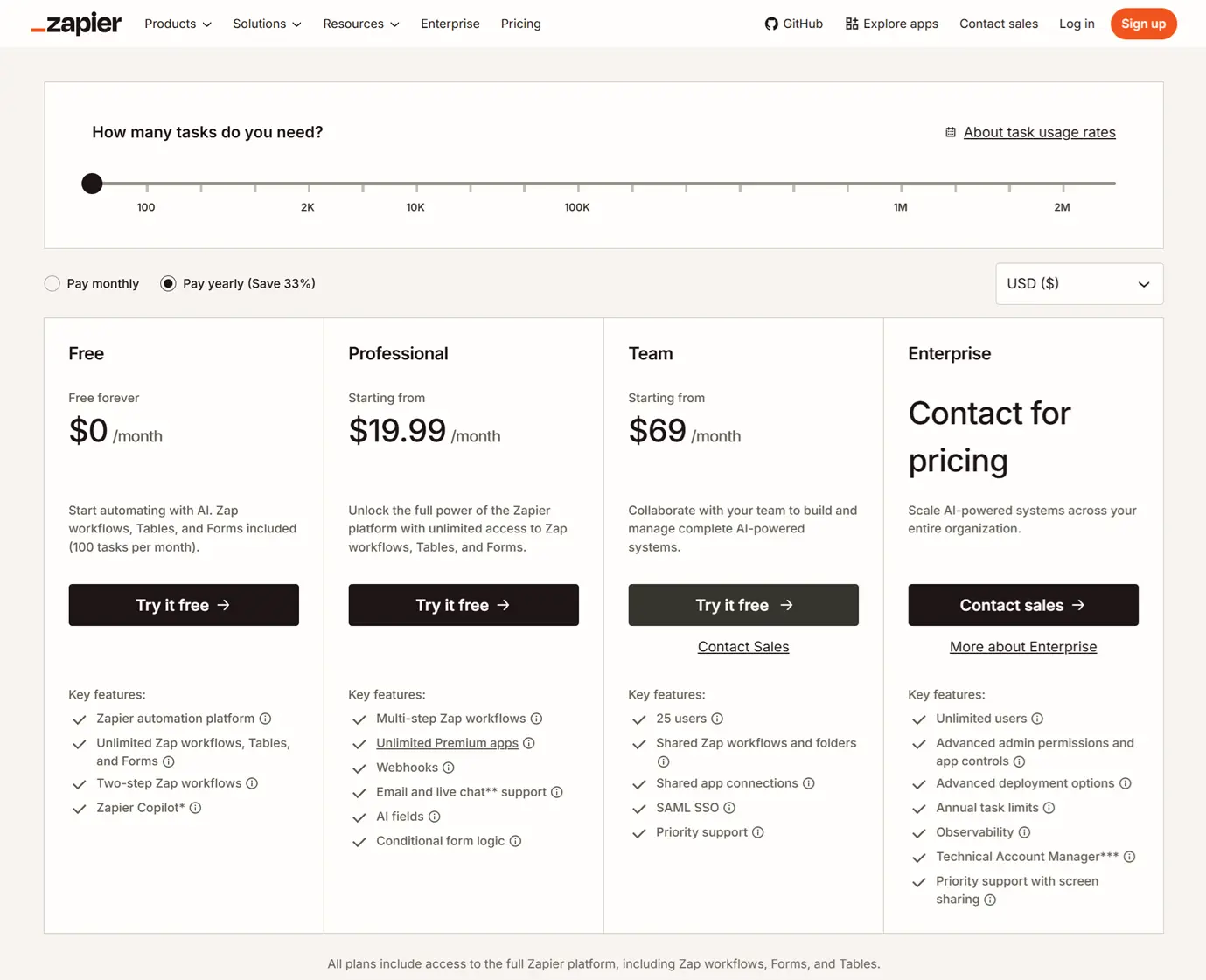
- Free plan: 100 tasks/month, but limited to two-step Zaps (one trigger, one action). Enough to test whether it connects your apps, not to run real multi-step workflows.
- Professional: $19.99/mo billed annually ($29.99 monthly) 750 tasks, multi-step Zaps, conditional logic.
- Team: $69/mo annually shared workspaces.
Watch the ceiling. Zapier bills per task (each action step), so a multi-step Zap burns your quota faster than the plan name suggests. Know your monthly volume before upgrading.
➡️ Try Zapier free test whether it connects your apps.
HubSpot: best for free lead capture
HubSpot’s free CRM gives a small business a real lead-management foundation at $0: forms, email tracking, a deal pipeline, live chat, and a meeting scheduler.
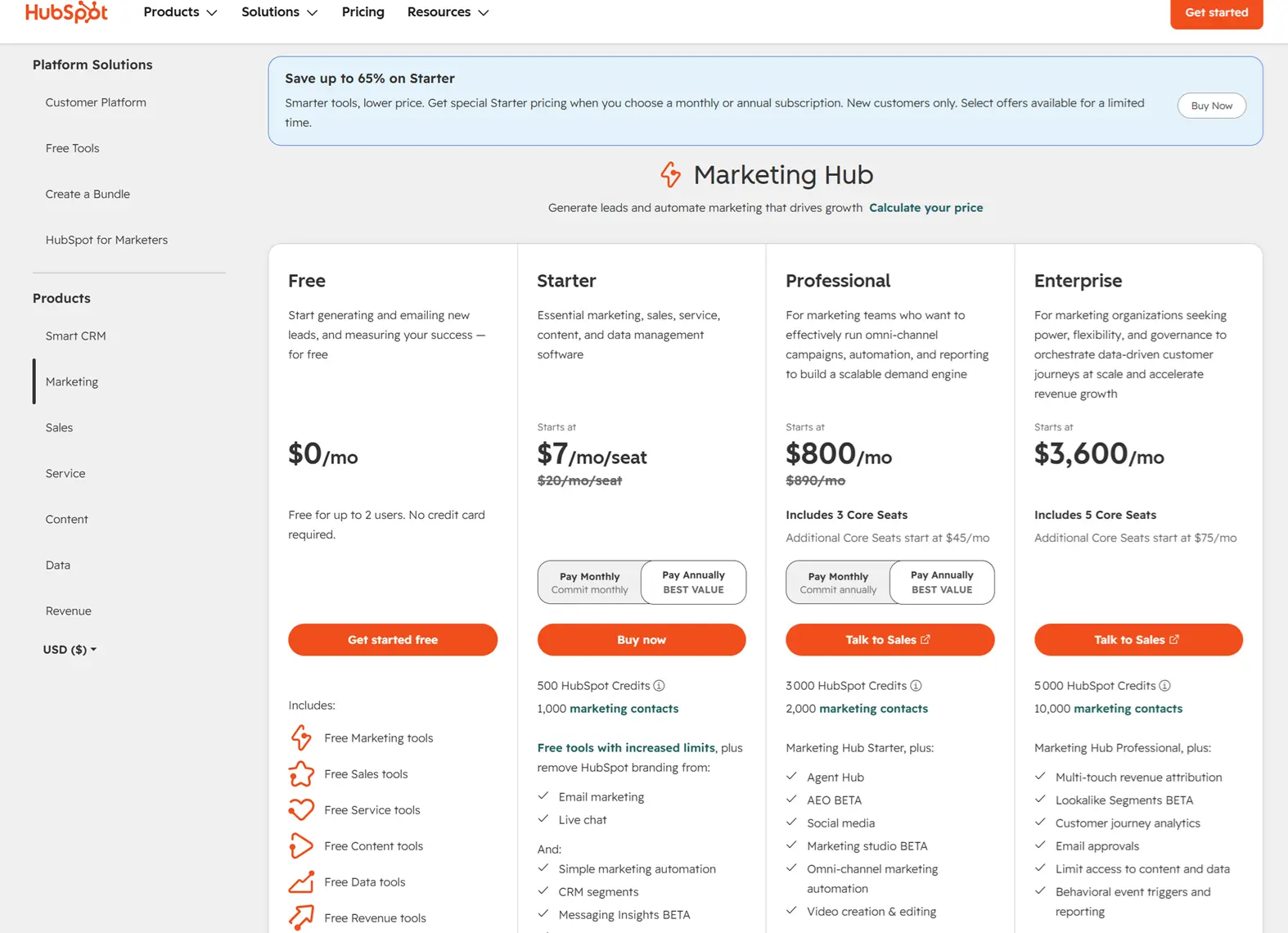
- Free plan: the CRM, forms, tracking, live chat, and scheduler for up to 2 users, with HubSpot branding. Important: the free tier does not include workflow automation. Automated sequences and lead-nurture workflows are paid features.
- Starter: $15/seat/mo (annual) where basic automation begins.
- Professional / Enterprise: Marketing Hub jumps to roughly $800/mo and $3,600/mo, plus onboarding fees.
Who it’s for: service businesses that want to capture and track leads for free and are ready to pay once they need real automation. Connects natively to Zapier to extend what it can do.
Tidio: best for automated customer support
Tidio combines live chat, chatbots, and automation. A bot handles common questions, qualifies leads, and collects contact details without a human.
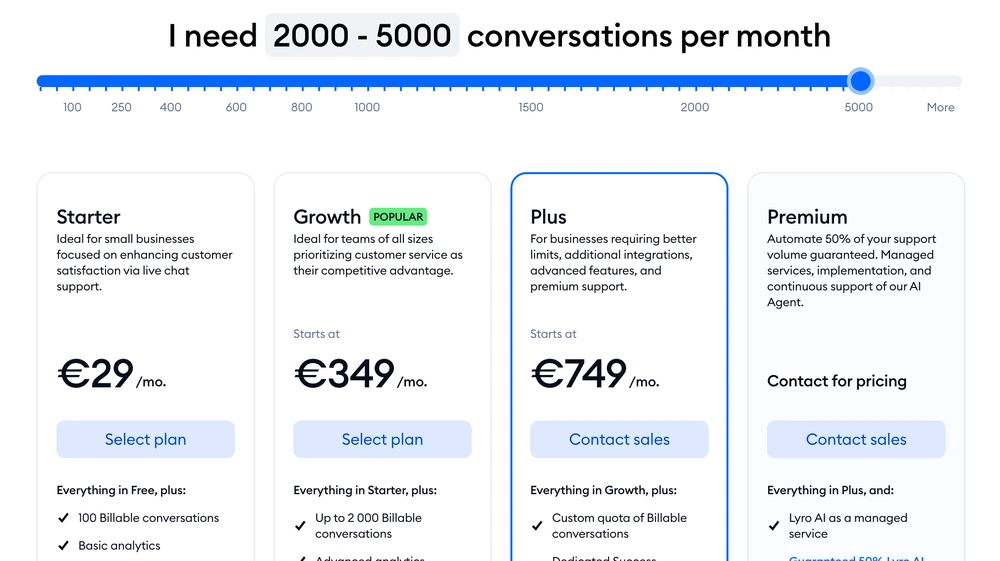
- Free plan: 50 conversations/month, basic live chat and flows. Good for testing.
- Starter: $29/mo. Growth: $59/mo. Tidio+: from $749/mo.
- One catch: the real AI agent (Lyro) is a separate paid add-on on the lower plans, not included by default.
Who it’s for: e-commerce and service businesses drowning in repetitive, after-hours questions.
Calendly: best for scheduling
Calendly removes scheduling friction entirely. Set your availability, share one link, and clients book themselves with automatic confirmations and reminders. It’s one of the highest-impact automations you can deploy in under an hour.
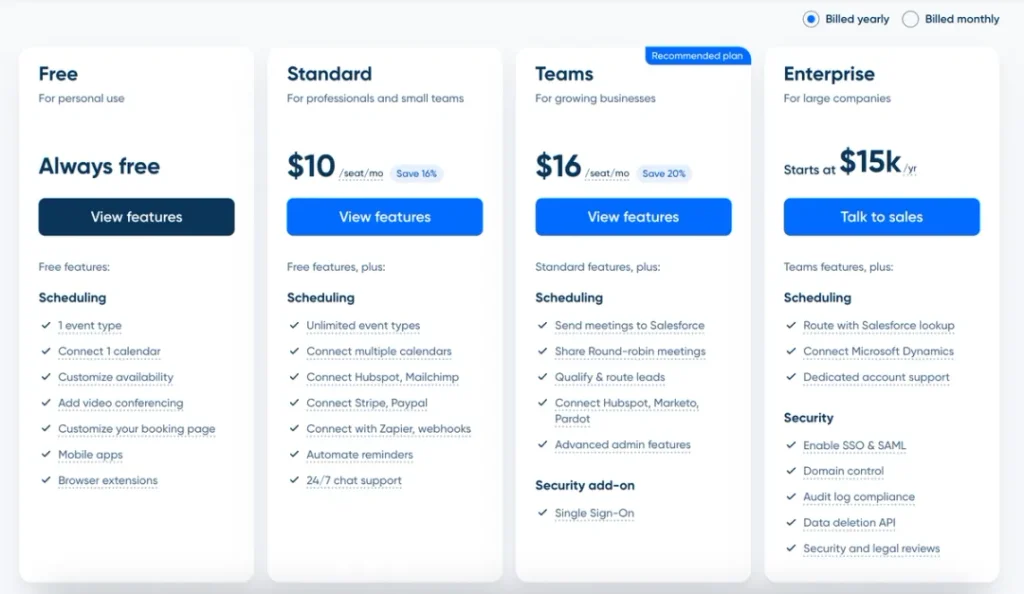
- Free plan: one event type, unlimited bookings. Fully functional for a solo owner.
- Standard: $10/seat/mo (annual). Teams: $16/seat/mo (annual).
Who it’s for: anyone who books calls, consultations, or appointments. The free plan alone covers most solo businesses.
What AI automation can’t do (honest warning)
Automation doesn’t fix a broken process faster software just spreads the mess at scale. Fix the process first, then automate it. It also makes mistakes, so keep a human eye on invoices, customer replies, and anything sensitive. And costs rise faster than expected: several of these tools look cheap at the entry price, then trigger expensive upgrades as usage grows. Always check the pricing ceiling, not just the starting price. Finally, automation won’t rescue a weak offer if your message isn’t clear, no workflow will compensate.
How to start automating this week
Don’t try to automate the whole business at once that’s how you create chaos and quit after two weeks.
- List your top three repeat tasks. Follow-up, invoicing, scheduling, support, and social posting.
- Pick one workflow only the task that drains the most time or causes the most daily friction.
- Choose one beginner-friendly tool for that task: Zapier for app-to-app, Tidio for support, Calendly for scheduling, and Canva for content.
- Run a two-week test. Track time saved or faster response times. Keep it only if it earns its place.
- Expand slowly. Once one workflow runs cleanly, add a second.
If your budget is zero, start with the free tiers on Calendly, HubSpot, Canva, and Zapier all four let you test real automation before spending a dollar.
Which tool is right for you?
| Your bottleneck | Best tool | Cost |
|---|---|---|
| Manual data entry between apps | Zapier | $0–19.99/mo |
| Slow lead follow-up | HubSpot free CRM | $0/mo |
| Repetitive support questions | Tidio | $0–29/mo |
| Scheduling back-and-forth | Calendly | $0–10/mo |
| Social content bottleneck | Canva Pro | ~$15/mo |
The most effective way to use AI automation for small business isn’t buying the most expensive platform it’s matching one automation to one measurable problem. Pick the task that drains your week, test one tool for two weeks, and keep it only if it saves real, measurable time. Start lean, prove the value, then scale.
FAQ

Fedora writes step-by-step guides for non-technical founders, turning complex SaaS setups into clear, follow-along tutorials. She focuses on getting small business owners from sign-up to first results without the jargon.