
What is SaaS software? A complete guide for beginners
Businesses using cloud software automate at least one process in 81% of cases, and small-business leaders using modern software stacks can save meaningful admin time each week.
If you run emails, invoices, social posts, and client work yourself, the real problem is not software choice alone. It is paying for tools you never fully use.
This guide explains what SaaS software is, how does SaaS work in plain English, and which beginner-friendly tools give the best value on a $0 to $200 monthly budget.
You will also see real SaaS examples for small business owners, a pricing-first stack, and the best picks by business type.
What is SaaS software?
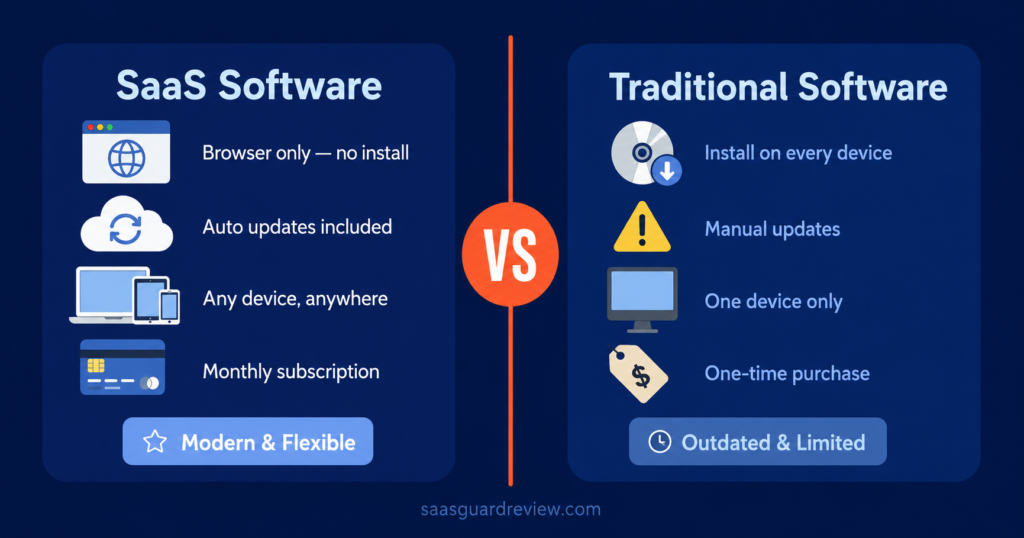
SaaS software means software as a service. You pay a monthly or annual subscription and use the tool online instead of installing and maintaining it on your own server.
For a small business owner, that usually means predictable monthly pricing, fast setup, automatic updates, and access from anywhere with an internet connection.
How does SaaS work?
SaaS runs in the vendor’s cloud environment. The provider handles hosting, updates, security, and core maintenance while you log in through a browser or app.
That model matters for small businesses because it removes large upfront IT costs and makes monthly budgeting easier.
Why beginners like it
- You can start at $0 with many tools.
- Setup often takes less than 30 minutes.
- You can cancel or upgrade as you grow.
- Remote access works well for solo operators and small teams.
How we tested these tools
We judged each tool on five practical points: real business tasks, US-friendly support, setup in under 30 minutes, 90-day ROI potential, and transparent USD pricing.
The focus stayed on tasks small owners actually do every week, like sending invoices, managing projects, replying to leads, creating graphics, and running email campaigns.
The tools below fit one of these goals:
- Save time on repeat work.
- Replace a manual spreadsheet or inbox workflow.
| Tool | Best for | Free plan? | Price USD/mo | Ease of use | Rating |
| HubSpot Sales Hub | Leads and follow-up | Yes | $0, then $15/seat monthly | Easy | 8.8/10 |
| Canva | Social content and basic design | Yes | $0, then about $12.99 to $15 | Very easy | 9.0/10 |
| QuickBooks Online | Invoices and bookkeeping | Trial offers available | About $38 to $115 | Medium | 8.6/10 |
| Trello | Task and project tracking | Yes | $0, then $5 to $6/user | Easy | 8.4/10 |
| Mailchimp | Email marketing | Yes | $0, then $13+ | Medium | 8.1/10 |
| Google Workspace | Email and docs | No free business tier | $7 annual or $8.40 monthly per user | Very easy | 8.9/10 |
- Stay inside a realistic budget between $0 and $200 per month.
These are strong SaaS software examples for small business owners who want simple setup and visible ROI.
<a href= »[AFFILIATE_LINK] » rel= »nofollow sponsored » target= »_blank »>get started free</a>
HubSpot Sales Hub
HubSpot is one of the clearest answers to what is SaaS software for a service business. You sign up online, use the CRM in your browser, and pay as your pipeline grows.
For a beginner, the big win is structure. You can track leads, emails, notes, and deal stages in one place without building your own system.
What it does for your business
It helps you capture leads, track follow-ups, and stop prospects from slipping through the cracks. The free tools cover basic CRM needs, while paid tiers add sequences, automation, and more pipeline control.
Real use case
A solo consultant in Dallas, Texas can use the free CRM to track discovery calls and follow-up emails in one dashboard. Upgrading to the $15 per seat plan makes sense once missed follow-ups start costing actual deals.
Pricing USD
HubSpot offers free tools, a Starter tier at $15 per seat monthly, and higher tiers that get expensive fast for small teams. Professional plans can jump well beyond a beginner budget.
✅ Advantages / 🔴 Drawbacks
- ✅ Great free entry point for lead management.
- ✅ Easy to understand for non-technical owners.
- 🔴 Costs climb quickly as features and seats increase.
- 🔴 Advanced tiers can feel too big for a one-person business.
Best for: service businesses that live on calls, quotes, and repeat follow-ups.
Rating: 8.8/10.
<a href= »[AFFILIATE_LINK] » rel= »nofollow sponsored » target= »_blank »>start today</a>
Canva
Canva is one of the easiest SaaS software examples list picks because almost anyone can use it in minutes. You open it in a browser, choose a template, and create graphics without hiring a designer.
That makes it useful for solopreneurs in Phoenix, Arizona who need flyers, Instagram posts, client decks, and quick promos on a tight budget.
What it does for your business
It handles day-to-day visual work like social posts, simple presentations, branded PDFs, and promotional graphics. The free plan covers a lot, while Pro adds premium templates, stock assets, and brand controls.
Real use case
A real estate assistant in Phoenix can build listing flyers and open-house posts on the free plan. Moving to Pro at about $12.99 to $15 per month makes sense when branded templates save several hours each week.
Pricing USD
Canva has a free plan, Pro at roughly $12.99 to $15 monthly, and team pricing that rises with users. Teams can become less cheap than people expect once the business grows.
✅ Advantages / 🔴 Drawbacks
- ✅ Extremely beginner-friendly.
- ✅ Strong value at $0 and solid value around $15 per month.
- 🔴 Teams pricing gets more expensive than many owners expect.
- 🔴 Not ideal for advanced design work.
Best for: solo businesses, local services, creators, and anyone who makes content weekly.
Rating: 9.0/10.
QuickBooks Online
QuickBooks answers a different beginner need. It replaces manual invoice tracking, expense sorting, and basic bookkeeping with one cloud account.
For many owners, that alone removes hours of admin and reduces tax-season panic.
What it does for your business
It sends invoices, tracks expenses, connects financial accounts, and gives you a cleaner view of cash flow. That matters if you still manage invoices from email and expenses from a spreadsheet.
Real use case
A freelance videographer in Atlanta, Georgia can move from manual invoicing to QuickBooks and charge clients from one dashboard. The jump from around $38 to $75 per month can pay off if late invoices stop delaying cash flow.
Pricing USD
Current online pricing commonly starts around $38 monthly for Simple Start, then about $75 for Essentials and $115 for Plus. Trial promotions change, but renewals matter more than intro discounts.
✅ Advantages / 🔴 Drawbacks
- ✅ Strong fit for invoicing and expense tracking.
- ✅ Familiar choice for many US small businesses.
- 🔴 Pricing increased in 2026 renewals.
- 🔴 Setup feels tedious if your books are messy.
Best for: freelancers, consultants, agencies, and service businesses that send invoices every month.
Rating: 8.6/10.
<a href= »[AFFILIATE_LINK] » rel= »nofollow sponsored » target= »_blank »>try it free</a>
Trello
Trello is simple project management software sold as a service. You sign in online, build boards, and organize work without the weight of enterprise software.
That makes it one of the easiest answers to how does SaaS work in real life. You pay a monthly fee only if the free plan stops being enough.
What it does for your business
It tracks tasks, deadlines, content calendars, and client workflows in a visual board format. If your business runs on checklists and simple processes, that is often enough.
Real use case
A wedding planner in Miami, Florida can use Trello to track vendors, client approvals, and event-day tasks. The free plan works at first, then $5 per user monthly on Standard adds room to grow without wrecking the budget.
Pricing USD
Trello offers a free plan, Standard around $5 to $6 per user, and Premium around $10 to $12.50 per user depending on billing.
✅ Advantages / 🔴 Drawbacks
- ✅ Very low learning curve.
- ✅ Affordable entry pricing for small teams.
- 🔴 Can feel too basic for complex operations.
- 🔴 Better views and controls sit behind higher tiers.
Best for: solo operators and small teams managing repeat projects.
Rating: 8.4/10.
Google Workspace
Google Workspace is a classic SaaS example for small business because it bundles business email, cloud storage, docs, sheets, calendar, and meetings into one subscription.
For many businesses, it is the first paid SaaS tool worth buying because it touches almost every workday task.
What it does for your business
It gives you branded email, shared files, calendars, video meetings, and collaborative documents in one account. That beats juggling a personal Gmail, local files, and scattered tools.
Real use case
A two-person agency in Dallas can move from personal inboxes to branded email and shared docs for about $14 per month on annual Starter billing. That adds credibility fast when clients expect a real business domain.
Pricing USD
Business Starter costs about $7 per user monthly on annual billing or $8.40 month to month. Business Standard rises to about $14 annual or $16.80 monthly.
✅ Advantages / 🔴 Drawbacks
- ✅ Covers email, docs, meetings, and storage in one plan.
- ✅ Easy for beginners to adopt.
- 🔴 No true free business tier.
- 🔴 Monthly pricing rises as users add up.
Best for: almost any small business that needs professional email and shared files.
Rating: 8.9/10.
Rapid reviews — remaining tools
Mailchimp
Mailchimp still works well for email marketing if your list is small and you want familiar templates. Its free tier is limited, and paid pricing starts at $13 per month for Essentials with 500 contacts.
The catch is growth. Once your list reaches 5,000 contacts, pricing can jump to $75 on Essentials or $100 on Standard, which hurts a lean budget.
Best for: newsletters, welcome emails, and simple automations.
Main drawback: costs rise with contact count, not just features.
Rating: 8.1/10.
Stack by budget USD , what to buy first
A beginner stack should solve core business work first. That means email, files, invoices, tasks, and basic marketing before anything fancy.
$0 per month
Use Canva Free, Trello Free, Mailchimp Free, and HubSpot Free. That covers a big share of content, planning, lead tracking, and basic email work at zero cost.
This level can realistically cover around 60% of core admin and marketing tasks for a solo operator.
$50 per month
A practical solopreneur stack is Google Workspace Starter at $7, Canva Pro at about $12.99 to $15, Trello Standard at $5, and QuickBooks around $38 only if invoicing is a pain point.
That mix lands near $25 to $65 before accounting, and it stays focused on tools with obvious daily use.
$100 to $200 per month
A small team of 3 to 10 people can combine Google Workspace, HubSpot Starter, Canva, and either QuickBooks or Mailchimp depending on the business model.
At this level, you are still far below the cost of a US virtual assistant at roughly $1,500 to $2,000 per month.
<a href= »[AFFILIATE_LINK] » rel= »nofollow sponsored » target= »_blank »>get started free</a>
Which tool fits which business type?
The best SaaS software depends on the business model more than the trend. A freelancer does not need the same stack as an online store.
- Solopreneur: Google Workspace, Canva, Trello, QuickBooks.
- Service business: HubSpot, Google Workspace, QuickBooks.
- E-commerce: Google Workspace, Canva, Mailchimp, Trello.
- Content creator: Canva, Google Workspace, Mailchimp, Trello.
Internal links to add:
- Anchor text: best ai software for small business → /best-ai-software-small-business-2026/
- Anchor text: small business CRM software → /best-crm-software-small-business/
What is SaaS software in simple terms? It is software you rent online, use fast, and scale without heavy setup or IT overhead.
For most beginners, Google Workspace is the safest first paid choice at about $7 per user on annual billing, because it improves email, files, meetings, and day-to-day collaboration right away.
<a href= »[AFFILIATE_LINK] » rel= »nofollow sponsored » target= »_blank »>start today</a>
For deeper tool-by-tool analysis, link this guide to: What Is SaaS Software? A Complete Guide for Beginners.
FAQ
What is SaaS software in simple wSaaS software is online software you access through a browser or app and pay for as a subscription. The provider manages hosting, updates, and maintenance.ords?
You create an account, pick a plan, and start using the tool online. The vendor handles the technical side, which lowers setup costs and saves time.
Common examples include Google Workspace for email and docs, QuickBooks for invoicing, Canva for design, Trello for tasks, and Mailchimp for email marketing.
For many basic admin and marketing tasks, yes. A starter software stack can cost under $50 to $200 per month, far below a US assistant at $1,500 to $2,000 monthly.